TCP vs UDP: When to Use What, and How TCP Relates to HTTP
Understand the key differences between TCP and UDP protocols. Learn when to use each, how HTTP works on top of TCP, and clear up the common confusion between transport and application layer protocols.
11 min read
Share
- The Internet Needs Rules
- What is TCP?
- TCP Characteristics
- The Phone Call Analogy
- What is UDP?
- UDP Characteristics
- The Announcement Analogy
- TCP vs UDP: Visual Comparison
- Side-by-Side Comparison
- When to Use TCP
- ✅ Web Browsing (HTTP/HTTPS)
- ✅ Email (SMTP, IMAP, POP3)
- ✅ File Transfer (FTP, SFTP)
- ✅ Database Connections
- ✅ Banking and Transactions
- When to Use UDP
- ✅ Video Streaming (Netflix, YouTube)
- ✅ Online Gaming
- ✅ Voice/Video Calls (VoIP, Zoom)
- ✅ DNS Lookups
- ✅ Live Broadcasts
- Real-World Use Cases
- Understanding Protocol Layers
- Simplified TCP/IP Model
- What is HTTP?
- HTTP Characteristics
- Example HTTP Request
- Example HTTP Response
- The Relationship Between TCP and HTTP
- How They Work Together
- The HTTP Over TCP Flow
- Why HTTP Needs TCP
- Common Beginner Confusion
- "Is HTTP the same as TCP?"
- "If I use HTTP, am I using TCP?"
- "Can HTTP run on UDP?"
- "Why doesn't HTTP replace TCP entirely?"
- HTTP Versions and Transport
- Quick Reference
- TCP vs UDP
- Protocol Layer Relationships
- Key Takeaways
- Conclusion
Every time you browse a website, send an email, or play an online game, data travels across the internet following specific rules. These rules are called protocols.
Two of the most important protocols at the transport layer are TCP and UDP. Understanding when to use each – and how they relate to HTTP – is fundamental knowledge for any developer.
Let's break it down.
The Internet Needs Rules
Imagine sending a letter to a friend. The postal system has rules:
- Addresses must be formatted correctly
- Letters go through sorting centers
- Someone signs for delivery (sometimes)
The internet works similarly. Without protocols, data would be chaos – packets going to wrong destinations, arriving out of order, or disappearing entirely.
Protocols are contracts
Protocols are agreed-upon rules that computers follow to communicate. Different protocols handle different jobs at different layers of the network.
What is TCP?
TCP (Transmission Control Protocol) is a connection-oriented protocol that guarantees reliable data delivery.
TCP Characteristics
| Feature | Description |
|---|---|
| Connection-oriented | Establishes connection before sending data |
| Reliable | Guarantees delivery, retransmits lost packets |
| Ordered | Data arrives in the correct sequence |
| Error-checked | Verifies data integrity with checksums |
| Flow control | Adjusts speed to prevent overwhelming receiver |
The Phone Call Analogy
TCP is like a phone call:
- You dial (establish connection)
- They answer "Hello?" (handshake)
- You confirm "Hi, can you hear me?" (acknowledgment)
- You have a conversation (data transfer)
- You say goodbye and hang up (connection close)
Both parties know the connection is active, and you can ask them to repeat if you missed something.
What is UDP?
UDP (User Datagram Protocol) is a connectionless protocol that prioritizes speed over reliability.
UDP Characteristics
| Feature | Description |
|---|---|
| Connectionless | No handshake, just sends data |
| Unreliable | No guarantee of delivery |
| Unordered | Packets may arrive out of order |
| Fast | Minimal overhead, low latency |
| Simple | No connection state to maintain |
The Announcement Analogy
UDP is like a loudspeaker announcement:
- You grab the microphone
- You make your announcement
- You put down the microphone
You don't know who heard you, if they understood you, or if they missed parts. But it's fast and reaches everyone simultaneously.
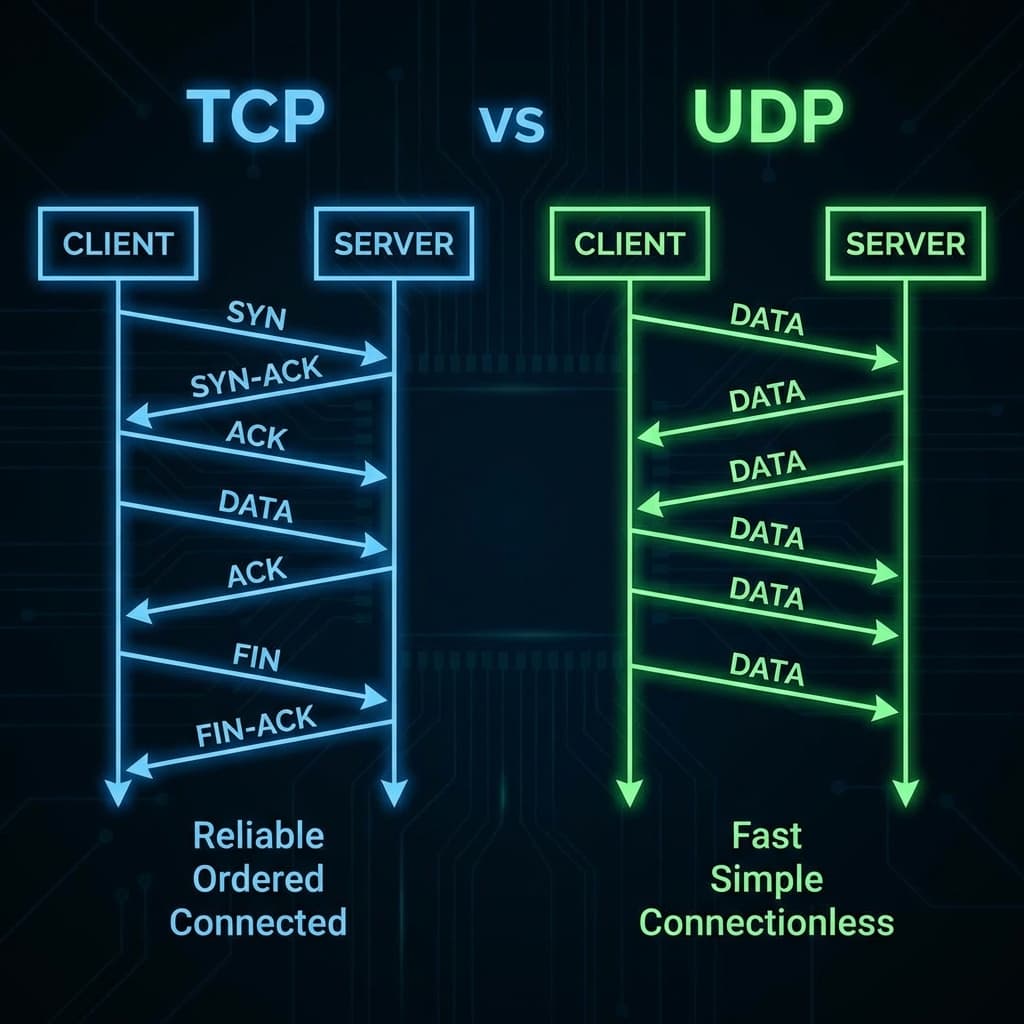
TCP vs UDP: Visual Comparison
TCP vs UDP communication flow showing handshake vs direct data transfer
Side-by-Side Comparison
| Aspect | TCP | UDP |
|---|---|---|
| Connection | Required (3-way handshake) | Not required |
| Reliability | Guaranteed delivery | Best effort |
| Ordering | Packets arrive in order | No ordering |
| Speed | Slower (overhead) | Faster |
| Header size | 20+ bytes | 8 bytes |
| Use case | When accuracy matters | When speed matters |
The same three messages, sent both ways:
1/5
When to Use TCP
Use TCP when accuracy and completeness are critical:
✅ Web Browsing (HTTP/HTTPS)
Every byte of a webpage must arrive correctly. A missing CSS file or corrupted JavaScript breaks the page.
✅ Email (SMTP, IMAP, POP3)
You can't have half an email. Every word, attachment, and header must arrive intact.
✅ File Transfer (FTP, SFTP)
Downloading a file with missing bits gives you a corrupted file. TCP ensures every byte arrives.
✅ Database Connections
When you send a query to a database, you need the complete, correct response.
✅ Banking and Transactions
Financial data must be 100% accurate. A missing digit could transfer wrong amounts.
When data integrity is non-negotiable
If losing even one packet would break your application, use TCP.
When to Use UDP
Use UDP when speed and real-time performance are critical:
✅ Video Streaming (Netflix, YouTube)
A few dropped frames are invisible to viewers. Waiting for retransmission would cause buffering.
✅ Online Gaming
In games, you need the latest position data NOW. Old data (even if complete) is useless. Speed > accuracy.
✅ Voice/Video Calls (VoIP, Zoom)
A tiny audio glitch is better than delayed audio. Real-time communication can't wait for retransmission.
✅ DNS Lookups
Quick queries that fit in a single packet. If it fails, just ask again.
✅ Live Broadcasts
Streaming to thousands simultaneously. Can't establish TCP connections with everyone.
When being fast beats being perfect
If your application can tolerate some data loss but needs low latency, use UDP.
Real-World Use Cases
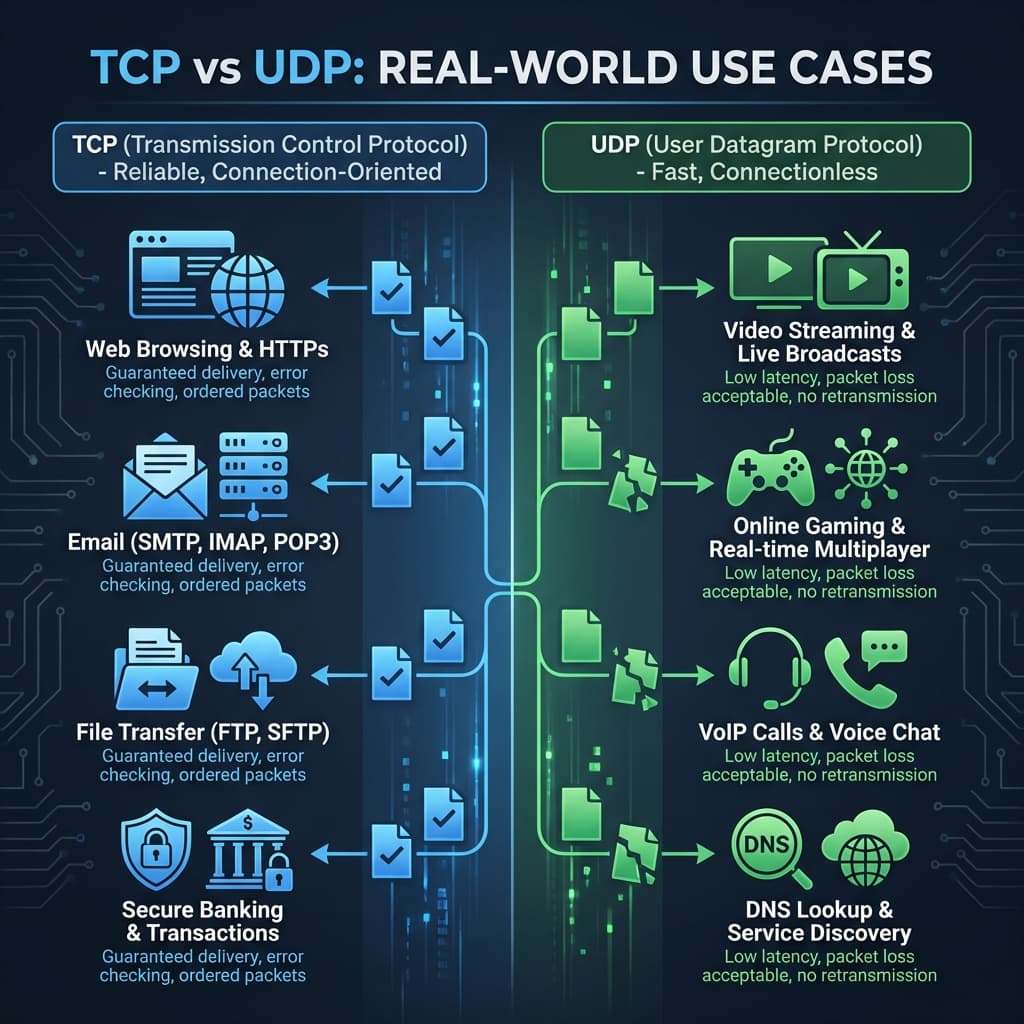 TCP vs UDP real-world use cases showing web, email, streaming, gaming
| Use Case | Protocol | Why |
|---|---|---|
| Loading a webpage | TCP | Every resource must arrive correctly |
| Sending an email | TCP | Complete message required |
| Downloading a file | TCP | File must be intact |
| Online banking | TCP | Accuracy is critical |
| YouTube streaming | UDP | Real-time, packet loss acceptable |
| Fortnite / PUBG | UDP | Low latency crucial for gameplay |
| Zoom video call | UDP | Real-time audio/video |
| DNS lookup | UDP | Simple query/response |
Understanding Protocol Layers
Before we discuss HTTP, we need to understand network layers. The internet is organized in stacks:
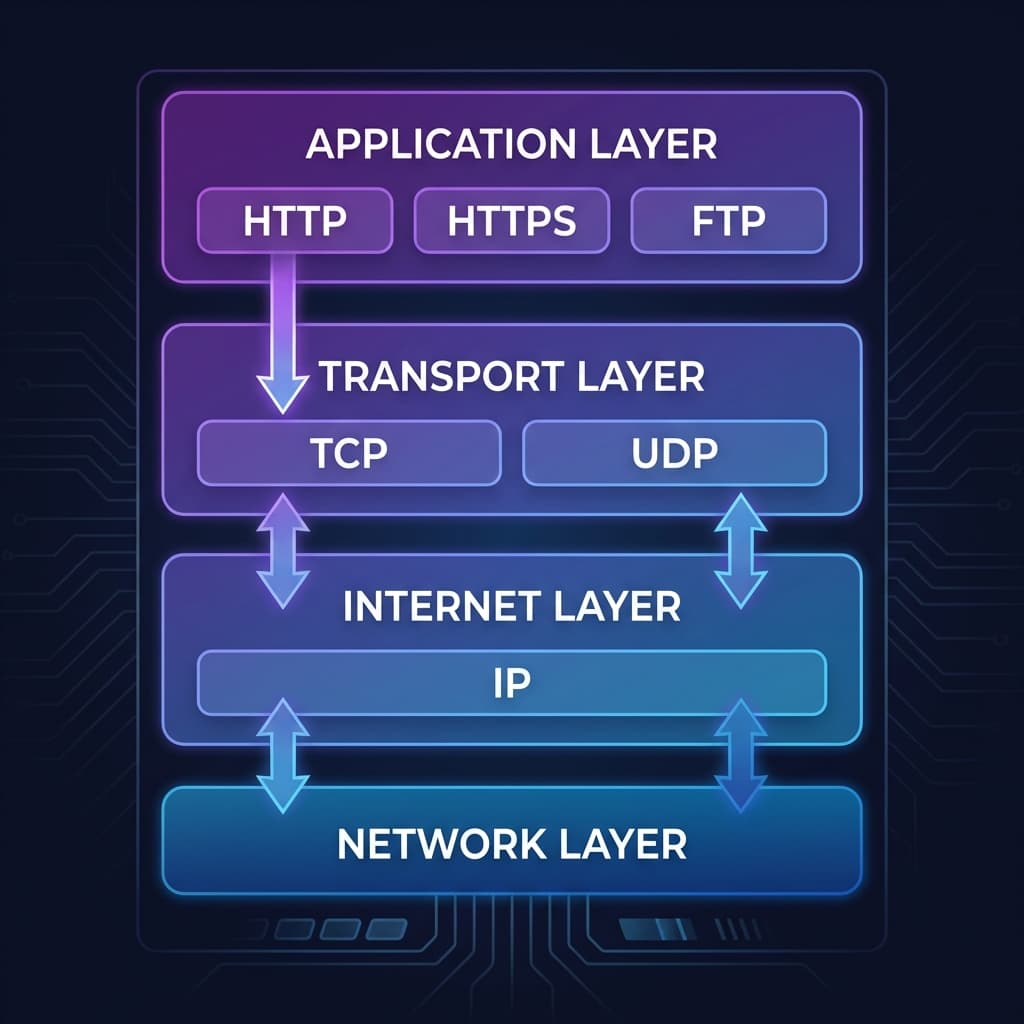 TCP/IP protocol layers showing Application, Transport, Internet, and Network layers
Simplified TCP/IP Model
| Layer | Purpose | Protocols |
|---|---|---|
| Application | User-facing protocols | HTTP, HTTPS, FTP, SMTP |
| Transport | Reliable/unreliable delivery | TCP, UDP |
| Internet | Routing across networks | IP |
| Network | Physical transmission | Ethernet, WiFi |
Key insight
HTTP is an Application layer protocol. TCP is a Transport layer protocol.
They work together but do different jobs.
What is HTTP?
HTTP (HyperText Transfer Protocol) is an application-layer protocol for transferring web resources (HTML, CSS, images, etc.).
HTTP Characteristics
- Request-response model: Client asks, server responds
- Stateless: Each request is independent
- Text-based: Human-readable headers
- Methods: GET, POST, PUT, DELETE, etc.
Example HTTP Request
GET /index.html HTTP/1.1
Host: example.com
User-Agent: Mozilla/5.0
Accept: text/html
Example HTTP Response
HTTP/1.1 200 OK
Content-Type: text/html
Content-Length: 1234

<!DOCTYPE html>
<html>...
The Relationship Between TCP and HTTP
Here's where it all comes together. HTTP runs on top of TCP.
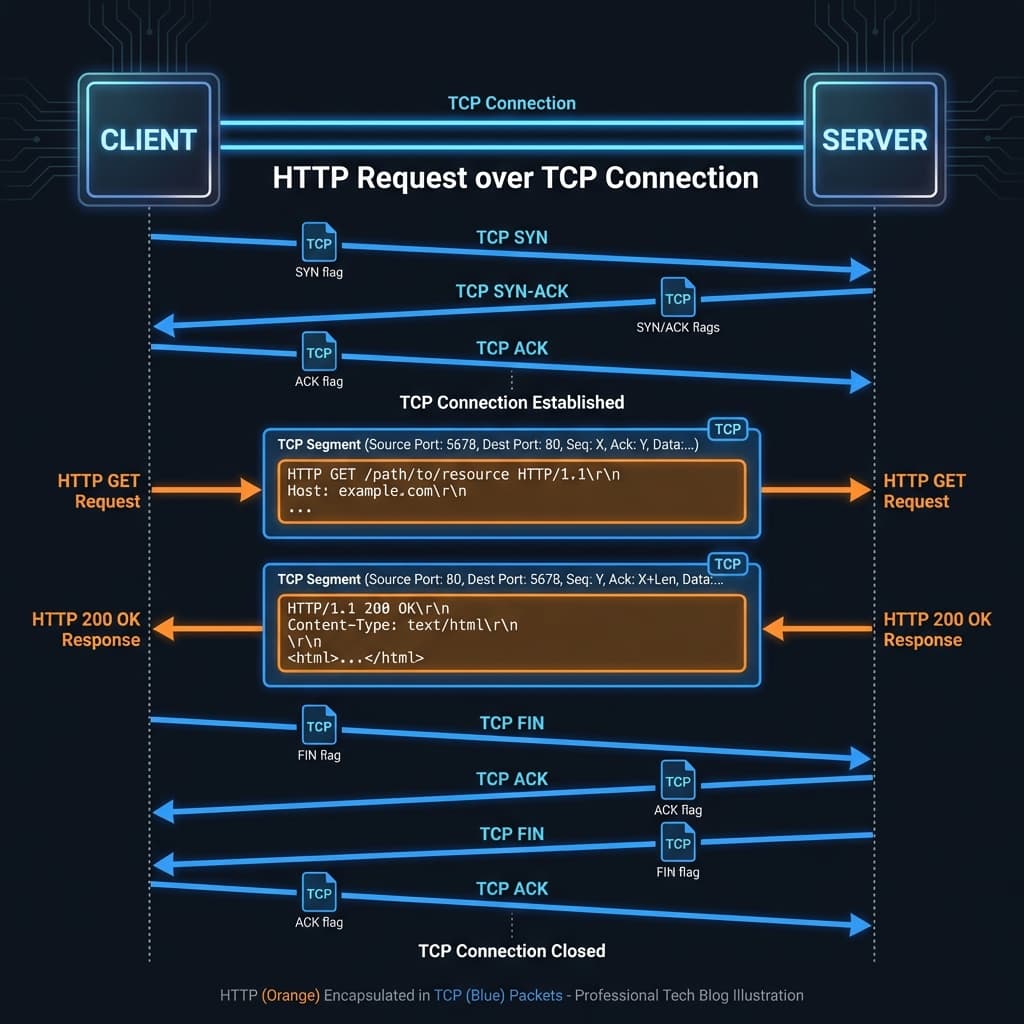 HTTP request flowing over a TCP connection showing encapsulation
How They Work Together
- TCP establishes the connection (3-way handshake)
- HTTP sends the request over the TCP connection
- HTTP receives the response over the same connection
- TCP closes the connection (or keeps it alive for reuse)
The HTTP Over TCP Flow
Client                                    Server
  │                                         │
  │──── TCP SYN ───────────────────────────>│
  │<─── TCP SYN-ACK ────────────────────────│
  │──── TCP ACK ───────────────────────────>│
  │                                         │
  │     [TCP Connection Established]        │
  │                                         │
  │──── HTTP GET /page.html ───────────────>│
  │<─── HTTP 200 OK + HTML content ─────────│
  │                                         │
  │──── TCP FIN ───────────────────────────>│
  │<─── TCP FIN-ACK ────────────────────────│
  │                                         │
  │     [TCP Connection Closed]             │
Why HTTP Needs TCP
HTTP needs reliable, ordered delivery:
- Missing HTML bytes = broken page
- Out-of-order data = corrupted content
- Duplicate packets = confusion
TCP provides all of this. HTTP focuses on what data to request, while TCP handles how to deliver it reliably.
Common Beginner Confusion
"Is HTTP the same as TCP?"
No! They are different protocols at different layers:
| Protocol | Layer | Job |
|---|---|---|
| HTTP | Application | Define web requests/responses |
| TCP | Transport | Reliable data delivery |
HTTP uses TCP, but doesn't replace it.
"If I use HTTP, am I using TCP?"
Yes! Traditional HTTP (1.1 and 2) runs over TCP. You're using both.
"Can HTTP run on UDP?"
Yes, but differently. HTTP/3 (QUIC) runs on UDP but adds its own reliability mechanisms. It's still reliable – QUIC handles what TCP normally would.
"Why doesn't HTTP replace TCP entirely?"
Because they do different jobs:
- TCP is general-purpose reliable transport
- HTTP is specific to web communication
Other protocols like SMTP (email) and FTP (files) also use TCP. They don't need HTTP's request/response model.
HTTP Versions and Transport
| HTTP Version | Transport | Notes |
|---|---|---|
| HTTP/1.1 | TCP | One request at a time per connection |
| HTTP/2 | TCP | Multiplexed streams, faster |
| HTTP/3 | QUIC (UDP) | Built-in reliability, even faster |
HTTP/3 is the future
HTTP/3 uses QUIC (over UDP) instead of TCP. QUIC includes its own reliability and ordering, giving the speed of UDP with the guarantees of TCP.
Quick Reference
TCP vs UDP
| Choose TCP When | Choose UDP When |
|---|---|
| Data must arrive completely | Speed is more important than completeness |
| Order matters | Real-time performance needed |
| Can tolerate latency | Can tolerate packet loss |
| Web, email, files | Streaming, gaming, VoIP |
Protocol Layer Relationships
┌─────────────────────────────┐
│     Application Layer       │
│  (HTTP, HTTPS, FTP, SMTP)   │
├─────────────────────────────┤
│      Transport Layer        │
│        (TCP, UDP)           │
├─────────────────────────────┤
│      Internet Layer         │
│           (IP)              │
├─────────────────────────────┤
│      Network Layer          │
│    (Ethernet, WiFi)         │
└─────────────────────────────┘
Key Takeaways
Remember These
- TCP = Reliable, ordered, connection-oriented (phone call)
- UDP = Fast, simple, connectionless (loudspeaker)
- Use TCP when accuracy matters (web, email, files)
- Use UDP when speed matters (streaming, gaming, VoIP)
- HTTP is an application-layer protocol for web communication
- HTTP runs on TCP – they work together at different layers
- HTTP/3 uses QUIC (UDP-based) but still provides reliability
Conclusion
Understanding TCP vs UDP isn't just academic – it affects real decisions in software development:
- Building a REST API? You're using HTTP over TCP
- Creating a real-time game? Consider UDP
- Implementing video chat? UDP with application-level handling
- Designing a file sync service? TCP for reliability
The key is matching the protocol to your requirements:
- Need every byte? → TCP
- Need it now? → UDP
- Need web resources? → HTTP (over TCP or QUIC)
As a full-stack developer, this knowledge helps you debug network issues, optimize performance, and make informed architectural decisions.
Happy networking! 🌐
Have questions about TCP, UDP, or HTTP? Drop a comment or reach out on Twitter @srtenginamath!

Written by Sharanayya R Tenginamath
Software Engineer at McD BERL with 4 years building scalable full-stack applications with React.js, Next.js, TypeScript, FastAPI and Python. Available to join from Oct 12, 2026.
Related articles
- Networking
- TCP
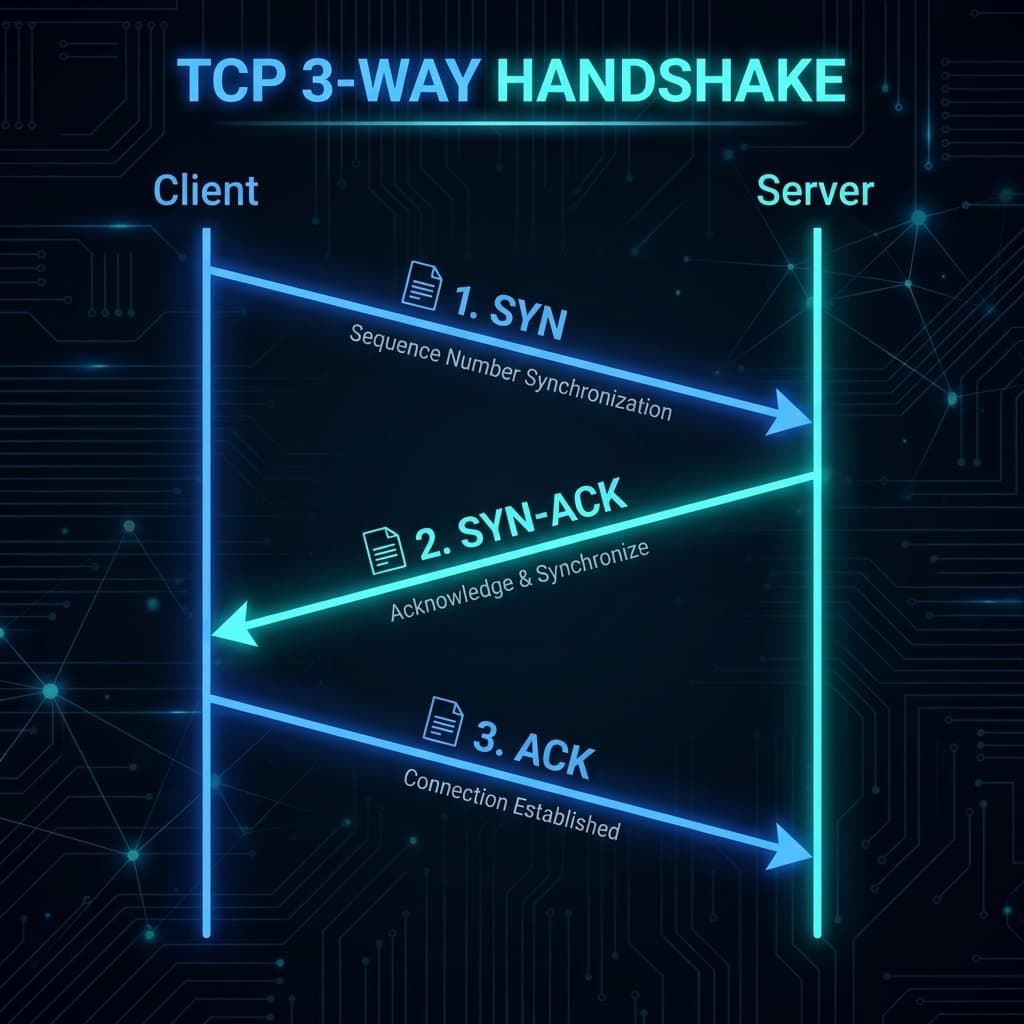
TCP Working: 3-Way Handshake & Reliable Communication Explained
Learn how TCP ensures reliable data transmission over the internet. Understand the 3-way handshake, sequence numbers, acknowledgments, retransmission, and connection termination with clear diagrams.
10 min read
- DNS
- Networking
DNS Record Types Explained: A, CNAME, MX, and More
Understand how the internet's phonebook works. A simple guide to A, AAAA, CNAME, MX, and TXT records.
5 min read
- JavaScript
- Async
JavaScript Promises : The Complete Guide to Async Code
Master JavaScript Promises from scratch — lifecycle, .then()/.catch()/.finally(), all static methods (all, allSettled, race, any), real-world examples, visual diagrams, and hands-on assignments. Written from 4+ years of full-stack development experience.
17 min read