JavaScript Promises : The Complete Guide to Async Code
Master JavaScript Promises from scratch — lifecycle, .then()/.catch()/.finally(), all static methods (all, allSettled, race, any), real-world examples, visual diagrams, and hands-on assignments. Written from 4+ years of full-stack development experience.
17 min read
Share
- The Real-Life Analogy: Applying for a Job
- What is a Promise?
- Creating a Promise
- Real-World Example: Submitting a Job Application
- Consuming Promises: `.then()`, `.catch()`, `.finally()`
- `.then()` — Handle Success
- `.catch()` — Handle Errors
- `.finally()` — Always Runs
- Promise Chaining — Sequence of Async Operations
- Returning Values in Chains
- Real-World Example: Job Application Portal
- Promise Static Methods — The Power Tools
- `Promise.resolve()` & `Promise.reject()` — Instant Settlement
- `Promise.all()` — Wait for All (Fail Fast)
- `Promise.allSettled()` — Wait for All (Never Fails)
- `Promise.race()` — First to Settle Wins
- `Promise.any()` — First Success Wins (ES2021)
- Quick Comparison Table
- Common Mistakes to Avoid
- Mistake 1: Forgetting to Return Promises in Chains
- Mistake 2: Creating Unnecessary Promise Wrappers
- Mistake 3: Swallowing Errors Silently
- Mistake 4: Not Handling `Promise.all()` Failures
- Hands-On Assignment — The Job Application Tracker
- Task 1: Create Your First Promise
- Task 2: Chain Async Steps — The Interview Journey
- Task 3: Apply to Multiple Companies — Use Static Methods
- Key Takeaways
- What's Next?
You've learned operators. Now it's time to tackle one of the most important concepts in modern JavaScript — Promises. They're the foundation of every API call, file upload, database query, and any other operation that takes time to complete.
After 4+ years of building full-stack applications, I can tell you: understanding Promises is what separates beginners from professional JavaScript developers.
Let's master them thoroughly.
The Real-Life Analogy: Applying for a Job
Imagine you apply for a Software Engineer role at a company. You submit your resume and go home.
The moment you hit Submit, the company gives you a confirmation email: "We've received your application. We'll get back to you soon." This confirmation email is your Promise.
You don't sit staring at your inbox all day — you carry on with your life, work on side projects, do other things. This is exactly asynchronous behavior. That application can only end in two ways:
- 🎉 Offer letter arrives → You celebrate, you sign it → Promise fulfilled
- ❌ Rejection email → "We went with another candidate" → Promise rejected
And regardless of which one happens, you eventually update your tracker (clear your calendar, close the tab) — this cleanup always happens → .finally()
This is exactly how JavaScript Promises work.
What is a Promise?
Promise Definition
A Promise is an object that represents the eventual completion (or failure) of an asynchronous operation and its resulting value. Think of it as a placeholder for a future value.
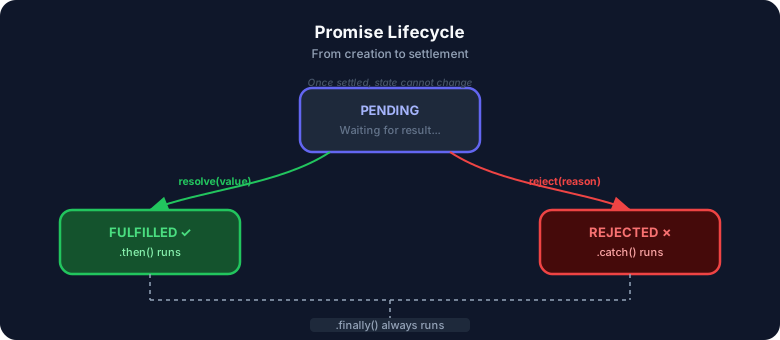
A Promise is always in one of three states:
| State | Meaning | Real-life |
|---|---|---|
| Pending | Operation in progress | Application under review |
| Fulfilled | Operation succeeded with a value | Offer letter received ✓ |
| Rejected | Operation failed with a reason | Rejection email ✗ |
Once a Promise settles (moves to fulfilled or rejected), it never changes state — just like a closed job application.
JavaScript Promise lifecycle — Pending to Fulfilled or Rejected states
Creating a Promise
You create a Promise by passing an executor function to the Promise constructor. This function receives two callbacks: resolve and reject.
const jobApplication = new Promise((resolve, reject) => {
  // Async work happens here (HR reviews your resume)
  const isHiring = true;

  if (isHiring) {
    resolve("🎉 Offer letter received!");  // Fulfills the Promise
  } else {
    reject("💔 Application rejected.");    // Rejects the Promise
  }
});
The Executor Runs Immediately
The executor function inside new Promise(...) runs synchronously — right when you create the Promise. Only the result (resolve/reject) is deferred. This trips up many beginners!
Real-World Example: Submitting a Job Application
// Simulating an async HR review with setTimeout
function submitApplication(company, isHiring) {
  return new Promise((resolve, reject) => {
    console.log(`📨 Application sent to ${company}...`);

    setTimeout(() => {
      if (isHiring) {
        resolve({ company, status: "shortlisted", nextStep: "Technical Interview" }); // ✅
      } else {
        reject(new Error(`${company}: No open positions right now`));                  // ❌
      }
    }, 1000); // Simulates 1 second HR review delay
  });
}
Consuming Promises: .then(), .catch(), .finally()
Creating a Promise is only half the story. You need to handle what happens when it settles.
.then() — Handle Success
.then() runs when a Promise is fulfilled. It receives the resolved value:
submitApplication("Google", true)
  .then((result) => {
    console.log("✅ Shortlisted at:", result.company);   // "Google"
    console.log("📋 Next step:", result.nextStep);        // "Technical Interview"
  });
.catch() — Handle Errors
.catch() runs when a Promise is rejected. Always add it — unhandled rejections crash Node.js apps:
submitApplication("Startup XYZ", false)
  .catch((error) => {
    console.log("💔 Rejected:", error.message); // "Startup XYZ: No open positions right now"
  });
.finally() — Always Runs
.finally() runs regardless of whether the Promise was fulfilled or rejected. Perfect for cleanup (hiding spinners, releasing resources):
submitApplication("Amazon", true)
  .then((result) => {
    console.log("✅ Shortlisted at:", result.company);
  })
  .catch((error) => {
    console.log("💔 Failed:", error.message);
  })
  .finally(() => {
    console.log("📁 Application tracker updated."); // Always runs, win or lose
  });
Always Add .catch()
In production code, always add .catch() to your Promise chains. An unhandled rejection in Node.js will crash your process. Modern environments log warnings for them by default.
Each .then() returns a new promise. Follow the chain:
1/4
Promise Chaining — Sequence of Async Operations
One of the most powerful features of Promises is chaining — each .then() returns a new Promise, so you can pipe multiple async operations in sequence.
// ❌ Callback hell — deeply nested, hard to read
submitApplication(company, function(result) {
  scheduleInterview(result, function(interview) {
    receiveOffer(interview, function() {
      console.log("Got the job!");
    });
  });
});

// ✅ Promise chain — readable, flat, professional
submitApplication("Google", true)
  .then((result) => scheduleInterview(result))   // returns a new Promise
  .then((interview) => receiveOffer(interview))  // returns a new Promise
  .then(() => console.log("✅ Offer signed!"))
  .catch((error) => console.error("💔 Process failed:", error.message))
  .finally(() => updateTracker());
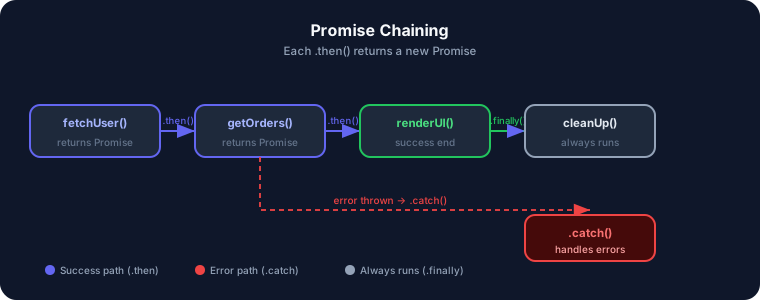 Promise chaining flow — how .then(), .catch(), and .finally() connect
Returning Values in Chains
Whatever you return from a .then() callback becomes the value passed to the next .then():
Promise.resolve(10)             // Start with value 10
  .then((val) => val * 2)      // 20
  .then((val) => val + 5)      // 25
  .then((val) => {
    console.log(val);          // 25
  });
The Chain Rule
If you return a plain value from .then(), the next .then() gets that value directly.
If you return a Promise, the chain waits for it to settle before continuing.
Real-World Example: Job Application Portal
function startApplicationProcess(company) {
  let spinner = document.getElementById("spinner");
  spinner.style.display = "block";

  submitApplication(company, true)
    .then((result) => {
      document.getElementById("status").textContent = result.status;
      return scheduleInterview(result);   // returns Promise
    })
    .then((interview) => {
      renderInterviewDetails(interview);
      return completeInterview(interview); // returns Promise
    })
    .then((finalResult) => {
      renderOfferBanner(finalResult);
    })
    .catch((error) => {
      showErrorBanner(`Application failed: ${error.message}`);
    })
    .finally(() => {
      spinner.style.display = "none"; // Always hide spinner
    });
}
Promise Static Methods — The Power Tools
JavaScript's Promise class has several static methods that work with multiple Promises at once. These are where Promises really shine in production code.
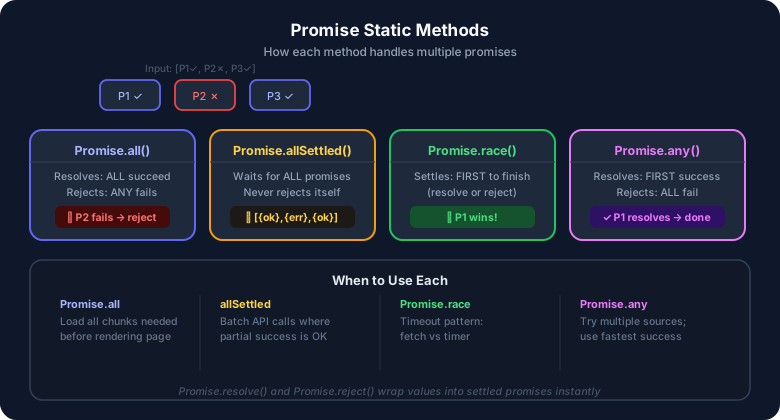 Promise static methods — all, allSettled, race, any compared
Promise.resolve() & Promise.reject() — Instant Settlement
These wrap a value into an already-settled Promise.
// Immediately resolved — like an instant decision
const p1 = Promise.resolve("🎉 Google offer accepted!");
p1.then((val) => console.log(val)); // "🎉 Google offer accepted!"

// Immediately rejected — like an instant rejection
const p2 = Promise.reject(new Error("💔 Application rejected."));
p2.catch((e) => console.error(e.message)); // "💔 Application rejected."
When do I use this? When a function always needs to return a Promise but you already have a cached result:
function getApplicationStatus(company) {
  if (cache[company]) {
    // Already processed — return instantly as a settled Promise
    return Promise.resolve(cache[company]);
  }
  // Not cached — make the real API call
  return fetch(`/api/applications/${company}`).then((r) => r.json());
}
Promise.all() — Wait for All (Fail Fast)
Promise.all() takes an array of Promises and returns a new Promise that:
- ✅ Resolves when ALL Promises resolve → result is an array of all values (in order)
- ❌ Rejects immediately if ANY Promise rejects (with that error)
// You need ALL three to make a hiring decision
const resumeCheck   = fetch("/api/resume-score").then((r) => r.json());
const bgVerify      = fetch("/api/background-check").then((r) => r.json());
const referenceCall = fetch("/api/references").then((r) => r.json());

Promise.all([resumeCheck, bgVerify, referenceCall])
  .then(([resume, bgCheck, references]) => {
    // All three cleared — extend the offer!
    extendOffer(resume, bgCheck, references);
  })
  .catch((error) => {
    // One failed — cannot proceed (all or nothing)
    console.error("Hiring check failed:", error.message);
  });
Order is Preserved
The result array from Promise.all() is always in the same order as the input array, even if Promises resolve in a different order. Very useful for destructuring!
Gotcha — it fails fast:
// Imagine one of the three checks fails
const resumeCheck   = Promise.resolve("Resume: ✅ Strong");
const bgVerify      = Promise.reject(new Error("Background check: ❌ Failed"));
const referenceCall = Promise.resolve("References: ✅ Excellent");

Promise.all([resumeCheck, bgVerify, referenceCall])
  .then((results) => console.log(results))          // Never runs
  .catch((e) => console.error(e.message));           // "Background check: ❌ Failed"
// resumeCheck and referenceCall resolved, but .all() discards them
Best for: Hiring pipelines where every check must pass before extending an offer.
Promise.allSettled() — Wait for All (Never Fails)
Promise.allSettled() always waits for every Promise to settle, and never rejects itself. The result is an array of objects describing each outcome:
// Send interview reminders to multiple candidates — some emails may fail
const notifySharan  = Promise.resolve("Sharan: ✅ Interview reminder sent");
const notifyRahul   = Promise.reject(new Error("Rahul: ❌ Email bounced"));
const notifyPriya   = Promise.resolve("Priya: ✅ Interview reminder sent");

Promise.allSettled([notifySharan, notifyRahul, notifyPriya])
  .then((results) => {
    results.forEach((result, index) => {
      if (result.status === "fulfilled") {
        console.log(`✅ Candidate ${index + 1}:`, result.value);
      } else {
        console.log(`❌ Candidate ${index + 1}:`, result.reason.message);
      }
    });
  });

// Output:
// ✅ Candidate 1: Sharan: ✅ Interview reminder sent
// ❌ Candidate 2: Rahul: ❌ Email bounced
// ✅ Candidate 3: Priya: ✅ Interview reminder sent
The result object for each Promise looks like:
// Fulfilled:
{ status: "fulfilled", value: "Sharan: ✅ Interview reminder sent" }

// Rejected:
{ status: "rejected", reason: Error("Rahul: ❌ Email bounced") }
allSettled vs all
Use Promise.all() when ALL checks must pass (background check, reference, resume — all required).
Use Promise.allSettled() when partial success is fine — like sending interview reminders where one failed email doesn't stop the rest.
Best for: Sending bulk interview invites, running independent pre-screening tasks, batch operations where one failure should not block the others.
Promise.race() — First to Settle Wins
Promise.race() returns a Promise that settles with the same value/reason as the first Promise to settle — whether that's a resolve or a reject.
// Three companies — whichever HR team responds first wins your attention
const googleHR    = new Promise((resolve) => setTimeout(() => resolve("📊 Google: Interview on Monday"), 500));
const amazonHR    = new Promise((resolve) => setTimeout(() => resolve("📊 Amazon: Interview on Tuesday"), 200));
const flipkartHR  = new Promise((resolve) => setTimeout(() => resolve("📊 Flipkart: Interview on Wednesday"), 800));

Promise.race([googleHR, amazonHR, flipkartHR])
  .then((first) => console.log("🏆 First reply:", first));
// 🏆 First reply: 📊 Amazon: Interview on Tuesday  (responded fastest at 200ms)
Classic use case — HR response deadline pattern:
function applyWithDeadline(company, deadlineMs) {
  const applicationPromise = fetch(`/api/apply/${company}`).then((r) => r.json());

  const deadlinePromise = new Promise((_, reject) =>
    setTimeout(
      () => reject(new Error(`⏱️ ${company} HR didn't respond within ${deadlineMs / 1000}s`)),
      deadlineMs
    )
  );

  return Promise.race([applicationPromise, deadlinePromise]);
}

applyWithDeadline("Google", 3000) // 3 second HR response deadline
  .then((result) => console.log("✅ Response:", result))
  .catch((e) => console.error("❌", e.message));
  // If HR doesn't respond in 3s: "⏱️ Google HR didn't respond within 3s"
Race Doesn't Cancel Losers
Losing Promises in Promise.race() still continue running — they just get ignored. JavaScript has no built-in way to cancel a Promise. Use AbortController with fetch if you need true cancellation.
Best for: Timeouts, trying the same request against multiple servers (use whichever responds first), UI responsiveness checks.
Promise.any() — First Success Wins (ES2021)
Promise.any() returns the first Promise that resolves successfully. It only rejects if ALL Promises reject.
// Applied to 3 companies — sign with whichever sends the offer first
const googleOffer    = submitApplication("Google", true);
const microsoftOffer = submitApplication("Microsoft", true);
const startupOffer   = submitApplication("Startup XYZ", true);

Promise.any([googleOffer, microsoftOffer, startupOffer])
  .then((result) => {
    console.log("✅ Signing with:", result.company); // Whoever resolves first
  })
  .catch((aggregateError) => {
    console.error("💔 All companies rejected:", aggregateError.errors);
  });
What's an AggregateError? When all Promises reject, Promise.any() rejects with an AggregateError that contains all the individual errors:
// All companies are on a hiring freeze
const allRejected = [
  Promise.reject(new Error("Google: Hiring freeze")),
  Promise.reject(new Error("Amazon: Position closed")),
  Promise.reject(new Error("Meta: No budget")),
];

Promise.any(allRejected)
  .catch((e) => {
    console.log(e instanceof AggregateError); // true
    console.log(e.errors);
    // [Error: "Google: Hiring freeze", Error: "Amazon: Position closed", Error: "Meta: No budget"]
  });
Difference from race(): Promise.any() ignores rejections until all have rejected. Promise.race() settles on the first settlement — including failures.
// Startup rejects fast; big company resolves later
const startup = new Promise((_, reject) => setTimeout(() => reject(new Error("Startup: No budget")), 100));
const bigCo   = new Promise((resolve) => setTimeout(() => resolve("🎉 BigCo: Offer extended!"), 500));

Promise.race([startup, bigCo])
  .catch((e) => console.log("race:", e.message));  // "race: Startup: No budget"

Promise.any([startup, bigCo])
  .then((v) => console.log("any:", v));             // "any: 🎉 BigCo: Offer extended!"
Best for: Multi-company job portals where you want the first acceptance, not the first response. Works great for CDN fallbacks and multi-region API endpoints too.
Quick Comparison Table
| Method | Resolves When | Rejects When | Returns |
|---|---|---|---|
Promise.all() | ALL resolve | ANY rejects | Array of values |
Promise.allSettled() | ALL settle | Never | Array of result objects |
Promise.race() | First settles | First rejects | Single value/error |
Promise.any() | First resolves | ALL reject | Single value / AggregateError |
Common Mistakes to Avoid
Mistake 1: Forgetting to Return Promises in Chains
// ❌ Bug — forgot return! Chain doesn't wait for scheduleInterview
submitApplication("Google", true)
  .then((result) => {
    scheduleInterview(result); // Missing return!
  })
  .then((interview) => {
    console.log(interview); // undefined — scheduleInterview wasn't awaited
  });

// ✅ Correct — return the Promise
submitApplication("Google", true)
  .then((result) => {
    return scheduleInterview(result); // ✅ return is key!
  })
  .then((interview) => {
    console.log(interview); // Has interview details ✅
  });
Mistake 2: Creating Unnecessary Promise Wrappers
// ❌ Avoid — wrapping a Promise that already exists
function applyToCompany(company) {
  return new Promise((resolve, reject) => {
    fetch(`/api/apply/${company}`)
      .then((r) => r.json())
      .then(resolve)
      .catch(reject);
  });
}

// ✅ Correct — just return the existing Promise
function applyToCompany(company) {
  return fetch(`/api/apply/${company}`).then((r) => r.json());
}
This anti-pattern is called the "Promise constructor anti-pattern" — I flag it in code reviews all the time.
Mistake 3: Swallowing Errors Silently
// ❌ Bug — catch doesn't re-throw or handle correctly
submitApplication("Amazon", false)
  .then((result) => renderApplicationStatus(result))
  .catch((e) => {
    // Silent catch — rejection disappears, user sees nothing
  });

// ✅ Always handle or re-throw
submitApplication("Amazon", false)
  .then((result) => renderApplicationStatus(result))
  .catch((e) => {
    console.error("Application failed:", e.message);
    showErrorMessage("Could not process application. Please try again.");
  });
Mistake 4: Not Handling Promise.all() Failures
// ❌ Any single rejection crashes silently
Promise.all([resumeCheck(), bgVerify(), referenceCall()])
  .then(([resume, bg, refs]) => {
    extendOffer(resume, bg, refs);
  });
// What if bgVerify fails? Nothing shows, no error displayed!

// ✅ Always catch
Promise.all([resumeCheck(), bgVerify(), referenceCall()])
  .then(([resume, bg, refs]) => {
    extendOffer(resume, bg, refs);
  })
  .catch((error) => {
    showError(`Hiring check failed: ${error.message}`);
  });
Hands-On Assignment — The Job Application Tracker
You're a developer applying to multiple companies. Let's simulate the entire journey using Promises! Create a file called promises.js:
Task 1: Create Your First Promise
// A company either accepts or rejects your application
function applyForJob(company, isHiring) {
  return new Promise((resolve, reject) => {
    console.log(`📨 Application submitted to ${company}...`);

    setTimeout(() => {
      if (isHiring) {
        resolve(`🎉 ${company} wants to interview you!`);
      } else {
        reject(new Error(`❌ ${company}: Not hiring right now.`));
      }
    }, 1500);
  });
}

// Try it!
applyForJob("Google", true)
  .then((msg) => console.log("✅", msg))
  .catch((err) => console.error("💔", err.message))
  .finally(() => console.log("📁 Application tracker updated."));
Task 2: Chain Async Steps — The Interview Journey
// Simulated async hiring steps
const scheduleInterview = (company) =>
  new Promise((resolve) =>
    setTimeout(
      () => resolve({ company, round: "Technical Interview" }),
      800
    )
  );

const completeInterview = (details) =>
  new Promise((resolve) =>
    setTimeout(
      () => resolve({ ...details, result: "Passed ✅" }),
      600
    )
  );

const receiveOffer = (details) =>
  new Promise((resolve) =>
    setTimeout(
      () => resolve({ ...details, salary: "₹24 LPA", joiningDate: "April 1" }),
      1000
    )
  );

// Chain the full hiring process!
applyForJob("Flipkart", true)
  .then((msg) => {
    console.log("✅", msg);
    return scheduleInterview("Flipkart");
  })
  .then((details) => {
    console.log(`📅 Scheduled: ${details.round} at ${details.company}`);
    return completeInterview(details);
  })
  .then((result) => {
    console.log(`🎯 Interview result: ${result.result}`);
    return receiveOffer(result);
  })
  .then((offer) => {
    console.log(`💼 Offer received! Salary: ${offer.salary}, Joining: ${offer.joiningDate}`);
  })
  .catch((err) => console.error("💔 Process failed:", err.message))
  .finally(() => console.log("📁 Tracker closed."));
Task 3: Apply to Multiple Companies — Use Static Methods
// Applying to multiple companies simultaneously
const applyAmazon = () =>
  new Promise((resolve) =>
    setTimeout(() => resolve("Amazon: Interview in 5 days"), 1000)
  );

const applyMicrosoft = () =>
  new Promise((resolve) =>
    setTimeout(() => resolve("Microsoft: Interview in 3 days"), 600)
  );

const applyStartup = () =>
  new Promise((_, reject) =>
    setTimeout(() => reject(new Error("Startup: Position filled")), 800)
  );

// Promise.all — need ALL to respond before deciding
console.log("\n--- Promise.all (big companies only) ---");
Promise.all([applyAmazon(), applyMicrosoft()])
  .then((results) => console.log("📬 All responses:", results))
  .catch((e) => console.error("One rejected:", e.message));

// Promise.allSettled — see every company's response
console.log("\n--- Promise.allSettled (all 3 companies) ---");
Promise.allSettled([applyAmazon(), applyMicrosoft(), applyStartup()])
  .then((results) => {
    results.forEach((r, i) => {
      const icon = r.status === "fulfilled" ? "✅" : "❌";
      const detail = r.status === "fulfilled" ? r.value : r.reason.message;
      console.log(`${icon} Company ${i + 1}: ${detail}`);
    });
  });

// Promise.race — first company to respond wins your attention
console.log("\n--- Promise.race (who replies first?) ---");
Promise.race([applyAmazon(), applyMicrosoft()])
  .then((first) => console.log("🏆 First to reply:", first));

// Promise.any — first company to ACCEPT wins
console.log("\n--- Promise.any (first acceptance) ---");
Promise.any([applyStartup(), applyMicrosoft(), applyAmazon()])
  .then((accepted) => console.log("🎯 First acceptance:", accepted))
  .catch((e) => console.error("All rejected:", e.message));
How to Run This
- Create
promises.jsand paste the code above - Open your terminal
- Run:
node promises.js
Observation: Watch how allSettled waits for all 3 companies, while race gives you Microsoft's reply immediately at 600ms!
Key Takeaways
Remember These
- A Promise represents a future value — Pending → Fulfilled or Rejected (immutable after settling)
- Use
.then()for success,.catch()for errors,.finally()for cleanup — always - Promise chaining replaces callback hell — each
.then()receives the previous return value - Always
returninside.then()when calling another async function, or the chain breaks Promise.all()— all or nothing; use when every result is requiredPromise.allSettled()— never rejects; use when partial success is finePromise.race()— first to settle (good or bad) wins; use for timeoutsPromise.any()— first to succeed wins; falls back gracefully; use for redundancyPromise.resolve()/Promise.reject()— wrap values into settled Promises instantly- Avoid the Promise constructor anti-pattern — don't wrap existing Promises unnecessarily
What's Next?
Now that you've mastered Promises, you're ready for the modern way to write async code:
async/await— syntactic sugar over Promises that makes async code look synchronous- Error handling with try/catch — the clean alternative to
.catch()chains - Fetch API — built on Promises, the standard way to make HTTP requests
- Event Loop — understanding how JavaScript manages async operations under the hood
Promises are the invisible backbone of modern web development — every API call, every animation, every real-time feature uses them under the hood.
Happy coding! 🚀
Have questions about JavaScript Promises? Drop a comment or reach out on Twitter @srtenginamath!

Written by Sharanayya R Tenginamath
Software Engineer at McD BERL with 4 years building scalable full-stack applications with React.js, Next.js, TypeScript, FastAPI and Python. Available to join from Oct 12, 2026.
Related articles
- JavaScript
- Web Development
JavaScript Operators — The Basics You Need to Know
Master JavaScript operators — arithmetic, comparison, logical, and assignment — with real-world examples, visual diagrams, truth tables, and hands-on assignments. A practical guide from 4+ years of full-stack development.
19 min read
- JavaScript
- Web Development
Understanding Variables and Data Types in JavaScript — The Complete Beginner's Guide
Learn JavaScript variables (var, let, const) and data types with real-life analogies, clear code examples, comparison diagrams, and hands-on assignments. A practical guide written from 4+ years of full-stack development experience.
15 min read
- CSS
- Web Development
CSS Selectors 101: Targeting Elements with Precision
Master CSS selectors from basics to advanced. Learn element, class, ID, group, and descendant selectors with practical examples. Build a solid foundation for styling web pages.
11 min read