Understanding Network Devices: Modem, Router, Switch, Firewall & Load Balancer
Learn how network devices work together to connect you to the internet. Understand modems, routers, switches, hubs, firewalls, and load balancers with real-world analogies and diagrams.
11 min read
Share
- The Big Picture: How Internet Reaches Your Devices
- What is a Modem?
- The Translator Analogy
- How It Works
- Types of Modems
- Modem Responsibilities
- What is a Router?
- The Post Office Analogy
- How It Works
- Key Router Functions
- NAT: One Public IP, Many Devices
- Switch vs Hub: How Local Networks Work
- What is a Hub?
- The Loudspeaker Analogy
- What is a Switch?
- The Direct Phone Call Analogy
- Hub vs Switch Comparison
- What is a Firewall?
- The Security Gate Analogy
- Types of Firewalls
- Firewall Rules Example
- Where Firewalls Sit
- What is a Load Balancer?
- The Restaurant Host Analogy
- Why Load Balancers?
- Load Balancing Algorithms
- Types of Load Balancers
- Layer 7 Routing Example
- How All Devices Work Together
- Request Flow: User to Database
- Production Architecture Example
- Device Summary Table
- For Software Engineers: Why This Matters
- Debug Production Issues
- Design Scalable Systems
- Optimize Performance
- Security Architecture
- Key Takeaways
- Conclusion
As a software engineer, you write code that runs on servers. But how does your code actually reach users? What happens between a user clicking a button and your server processing the request?
Understanding network devices isn't just for network engineers – it's essential knowledge for anyone building scalable, production-ready applications.
Let's explore each device, understand its role, and see how they work together.
The Big Picture: How Internet Reaches Your Devices
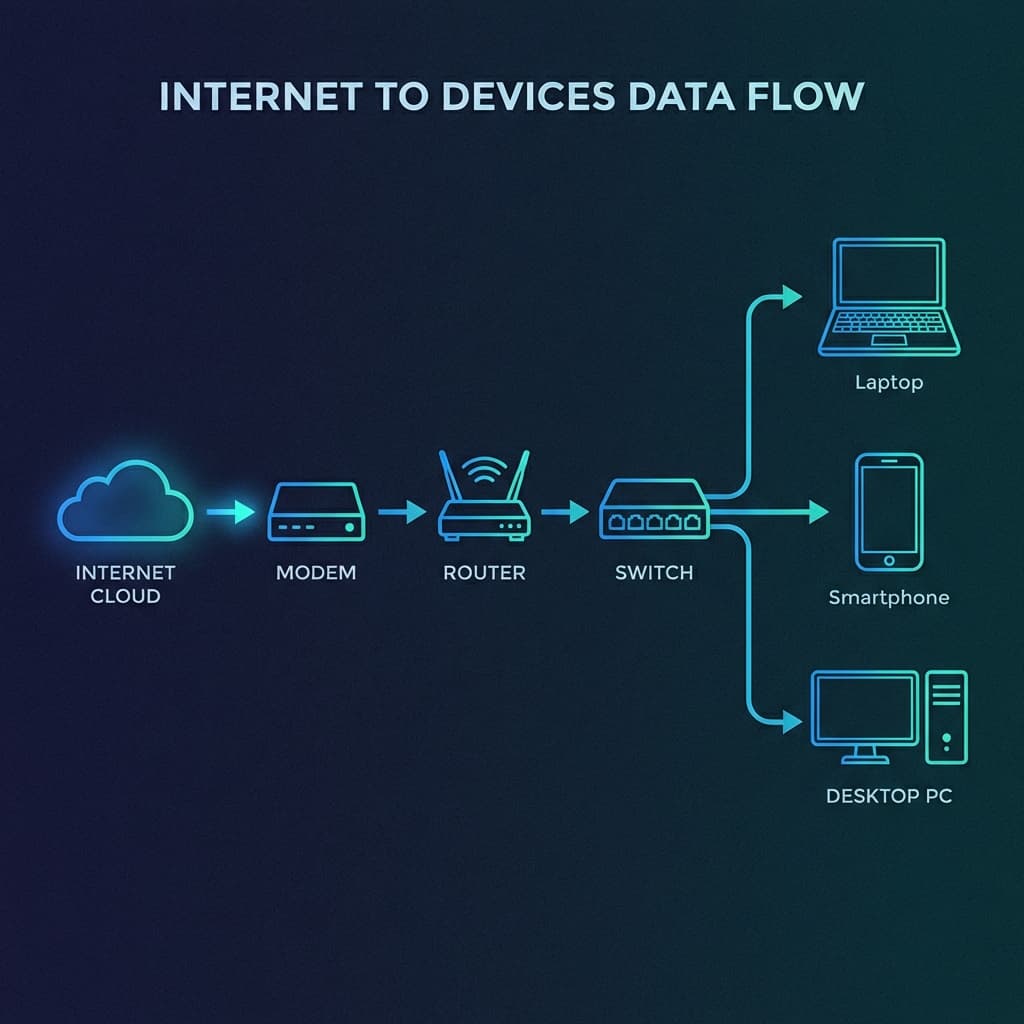
Before diving into individual devices, let's see the complete flow:
Internet to devices data flow showing Modem, Router, Switch, and end devices
Internet → Modem → Router → Switch → Your Devices
Each device has a specific job. Let's understand them one by one.
What is a Modem?
A modem (Modulator-Demodulator) is the gateway between your local network and the internet.
The Translator Analogy
Think of your ISP (Internet Service Provider) as speaking a foreign language (coaxial cable, fiber optic, DSL signals). Your devices speak a different language (Ethernet, digital signals).
The modem is the translator that converts between these languages.
How It Works
| Direction | What Happens |
|---|---|
| Incoming | Converts ISP signals → Digital data your network understands |
| Outgoing | Converts your digital data → Signals for ISP's infrastructure |
Types of Modems
| Type | Connection | Speed |
|---|---|---|
| DSL Modem | Phone line | Up to 100 Mbps |
| Cable Modem | Coaxial cable | Up to 1 Gbps |
| Fiber Modem (ONT) | Fiber optic | Up to 10 Gbps |
Modem vs Router
Many ISPs provide a combo device (modem-router). While convenient, these are two separate functions combined into one box.
Modem Responsibilities
- ✅ Connect to ISP infrastructure
- ✅ Translate signal types
- ✅ Provide a single connection point to the internet
- ❌ Does NOT manage multiple devices
- ❌ Does NOT provide WiFi (usually)
Follow one packet from your laptop to the internet:
1/5
What is a Router?
A router is the traffic controller of your network. It directs data between different networks – primarily between your local network and the internet.
The Post Office Analogy
Imagine the router as a post office:
- It receives mail (data packets) from outside
- Reads the address (IP destination)
- Knows which house (device) to deliver to
- Sends outgoing mail to the correct recipient on the internet
How It Works
Routers maintain a routing table – a map of where to send packets based on their destination:
Destination      Next Hop
192.168.1.0/24   Local Network
10.0.0.0/8       Gateway 1
0.0.0.0/0        Internet (via Modem)
Key Router Functions
| Function | Description |
|---|---|
| NAT | Translates private IPs to public IP |
| DHCP | Assigns local IP addresses to devices |
| Routing | Directs packets to correct destination |
| WiFi | Provides wireless connectivity |
| Firewall | Basic security filtering |
NAT: One Public IP, Many Devices
Your home might have 20 devices, but only one public IP from your ISP. NAT (Network Address Translation) makes this work:
Device A (192.168.1.10) ─┐
Device B (192.168.1.11) ─┼─→ Router (NAT) ─→ Internet (Public IP: 203.0.113.5)
Device C (192.168.1.12) ─┘
Private vs Public IP
Private IPs (192.168.x.x, 10.x.x.x) work only inside your network. Public IPs are globally unique and routable on the internet.
Switch vs Hub: How Local Networks Work
Once traffic enters your local network, devices need to communicate with each other. This is where switches and hubs come in.
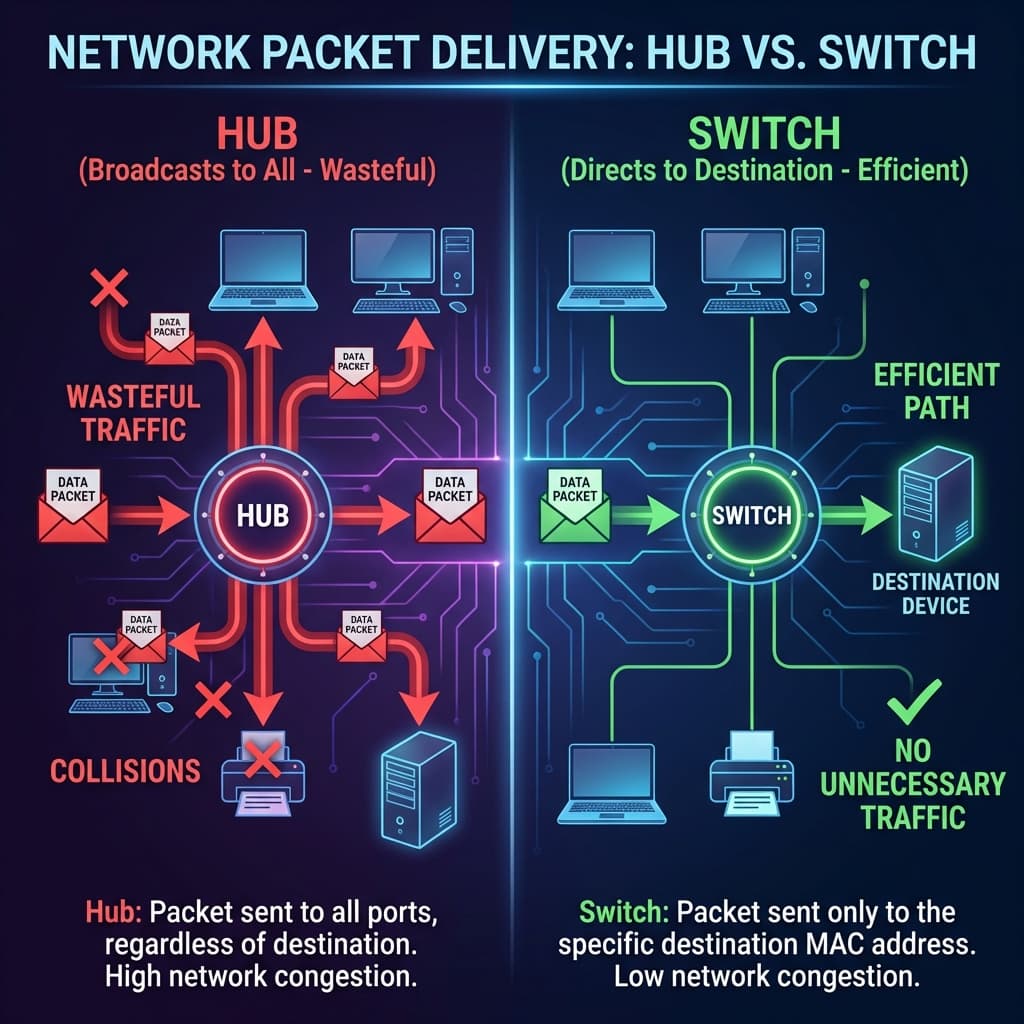 Hub vs Switch packet broadcast comparison showing inefficient vs efficient delivery
What is a Hub?
A hub is a dumb repeater. It receives data and broadcasts it to ALL connected devices.
The Loudspeaker Analogy
A hub is like someone with a loudspeaker in a room:
- They receive a message
- They shout it to everyone
- Everyone hears, even if they're not the intended recipient
- Wasteful and creates "noise"
What is a Switch?
A switch is intelligent. It learns which device is connected to which port and sends data only to the intended recipient.
The Direct Phone Call Analogy
A switch is like a switchboard operator:
- Receives a call for "John"
- Knows John is on line 4
- Connects directly to John
- Other people aren't disturbed
Hub vs Switch Comparison
| Feature | Hub | Switch |
|---|---|---|
| Intelligence | None | Learns MAC addresses |
| Delivery | Broadcasts to all | Sends to destination only |
| Collisions | High | Rare |
| Speed | Slow | Fast |
| Security | Low (all see all traffic) | Higher |
| Modern use | Almost obsolete | Standard in networks |
Hubs are obsolete
You'll rarely see hubs in modern networks. Switches are the standard for connecting devices within a LAN.
What is a Firewall?
A firewall is the security guard of your network. It inspects incoming and outgoing traffic and decides what's allowed or blocked.
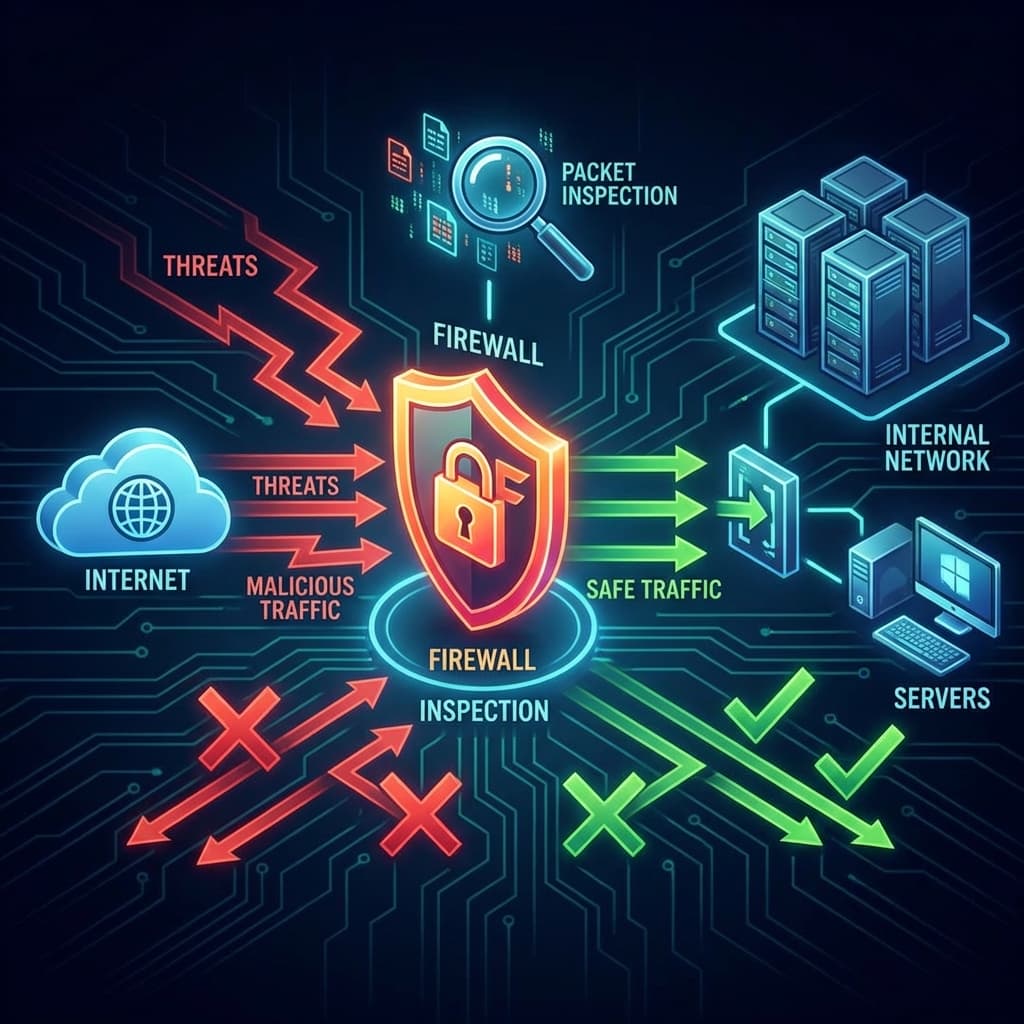 Firewall placement showing threat blocking and safe traffic allowing
The Security Gate Analogy
Think of a firewall as a security checkpoint at a building entrance:
- Checks everyone's ID (inspects packets)
- Has a list of allowed visitors (whitelist rules)
- Denies entry to unauthorized people (blocks threats)
- Logs who enters and exits (traffic logs)
Types of Firewalls
| Type | Description | Use Case |
|---|---|---|
| Packet Filter | Checks source/destination IP, port | Basic filtering |
| Stateful | Tracks connection state | Most common |
| Application | Inspects actual content (Layer 7) | Web Application Firewall (WAF) |
| Next-Gen (NGFW) | Deep inspection + threat intelligence | Enterprise security |
Firewall Rules Example
Rule 1: ALLOW TCP port 443 (HTTPS) from any source
Rule 2: ALLOW TCP port 22 (SSH) from IP 10.0.0.5 only
Rule 3: DENY  TCP port 22 from all other sources
Rule 4: ALLOW TCP port 80 (HTTP) from any source
Rule 5: DENY  all other traffic (default deny)
Where Firewalls Sit
| Location | Purpose |
|---|---|
| Perimeter | Between internet and internal network |
| Internal | Between network segments (DMZ, etc.) |
| Host-based | On individual servers/devices |
| Cloud (Security Groups) | Virtual firewalls in AWS, GCP, Azure |
Defense in Depth
Production systems often have multiple firewall layers: cloud security groups, network firewalls, and host-based firewalls all working together.
What is a Load Balancer?
A load balancer distributes incoming traffic across multiple servers to ensure no single server is overwhelmed.
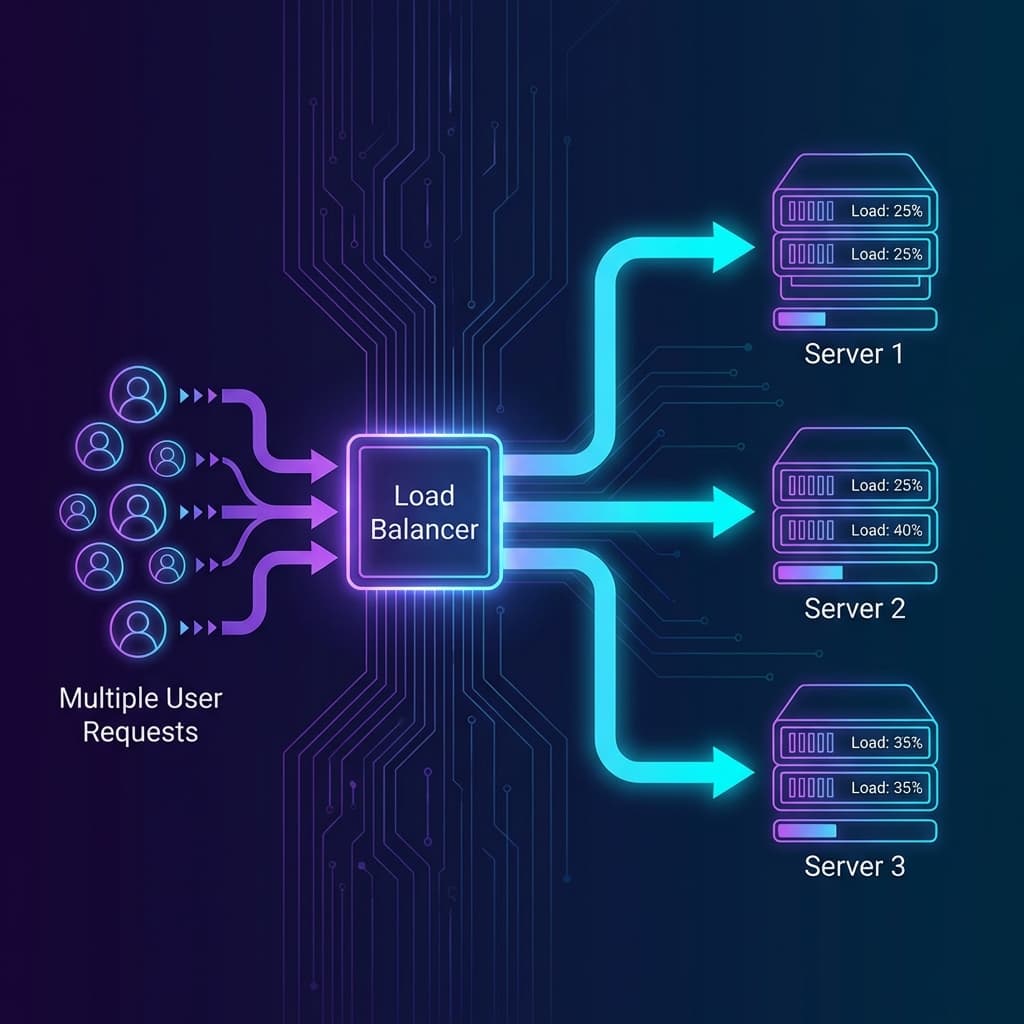 Load balancer distributing user requests across multiple servers
The Restaurant Host Analogy
Imagine a busy restaurant with multiple serving sections:
- The host (load balancer) greets customers
- Assigns them to different waiters (servers)
- Makes sure no single waiter is overloaded
- Keeps track of who's busy
Why Load Balancers?
| Problem | Solution |
|---|---|
| Single server overloaded | Distribute across multiple servers |
| Server goes down | Redirect traffic to healthy servers |
| Global users | Direct to nearest server (geo-routing) |
| Maintenance needed | Take servers offline without downtime |
Load Balancing Algorithms
| Algorithm | Description |
|---|---|
| Round Robin | Each server gets requests in rotation |
| Least Connections | Send to server with fewest active connections |
| IP Hash | Same client always goes to same server |
| Weighted | Some servers get more traffic based on capacity |
Types of Load Balancers
| Type | OSI Layer | What It Sees |
|---|---|---|
| L4 (Transport) | Layer 4 | IP, TCP/UDP port |
| L7 (Application) | Layer 7 | HTTP headers, URL, cookies |
Layer 7 Routing Example
Traffic for /api/*     → API Servers (3 instances)
Traffic for /static/*  → CDN/Static Servers
Traffic for /*         → Web Servers (5 instances)
Health Checks
Load balancers continuously check server health. If a server fails health checks, it's removed from rotation automatically.
How All Devices Work Together
Now let's see the complete picture of how these devices work together in a real-world web application:
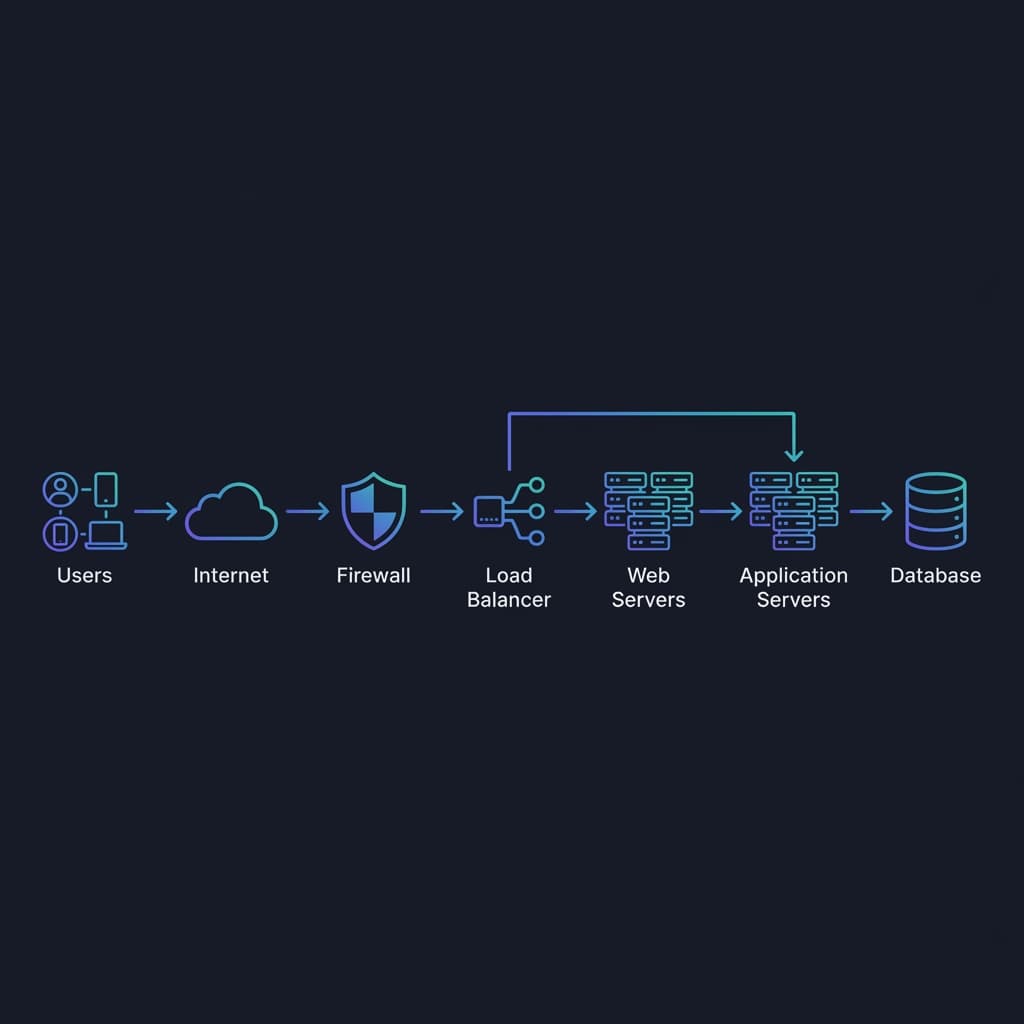 Complete web application network architecture showing all components
Request Flow: User to Database
1. User types example.com
2. DNS resolves to your public IP
3. Request hits your FIREWALL (security check)
4. LOAD BALANCER receives traffic
5. Routes to healthy WEB SERVER
6. Web server may call APPLICATION SERVER
7. App server queries DATABASE
8. Response flows back through same path
Production Architecture Example
┌─────────────────────────────────────────────────────────┐
│                        INTERNET                          │
└───────────────────────────┬─────────────────────────────┘
                            │
                    ┌───────▼───────┐
                    │   FIREWALL    │  ← Security checkpoint
                    └───────┬───────┘
                            │
                    ┌───────▼───────┐
                    │ LOAD BALANCER │  ← Traffic distribution
                    └───────┬───────┘
                            │
        ┌───────────────────┼───────────────────┐
        │                   │                   │
┌───────▼───────┐   ┌───────▼───────┐   ┌───────▼───────┐
│  Web Server 1 │   │  Web Server 2 │   │  Web Server 3 │
└───────┬───────┘   └───────┬───────┘   └───────┬───────┘
        │                   │                   │
        └───────────────────┼───────────────────┘
                            │
                    ┌───────▼───────┐
                    │   DATABASE    │
                    │   (Primary)   │
                    └───────────────┘
Device Summary Table
| Device | Primary Function | Analogy | Layer |
|---|---|---|---|
| Modem | Connect to ISP | Translator | Physical |
| Router | Direct traffic between networks | Post office | Network (L3) |
| Switch | Connect devices in local network | Phone switchboard | Data Link (L2) |
| Hub | Broadcast to all devices | Loudspeaker | Physical (L1) |
| Firewall | Security and filtering | Security guard | Network/App (L3-7) |
| Load Balancer | Distribute traffic | Restaurant host | Transport/App (L4-7) |
For Software Engineers: Why This Matters
Understanding network devices helps you:
Debug Production Issues
"Why can't users reach our app?"

Check: Firewall rules blocking? Load balancer health checks failing?
       Router misconfigured? DNS pointing to wrong IP?
Design Scalable Systems
"How do we handle 100,000 concurrent users?"

Design: Load balancer → Multiple app servers → Database cluster
        With proper firewall rules at each layer
Optimize Performance
"Why is latency high for some users?"

Consider: Geographic load balancing, CDN placement,
          Reducing network hops
Security Architecture
"How do we protect our database?"

Implement: Database in private subnet, only accessible from
           app servers, firewall rules restricting access
Key Takeaways
Remember These
- Modem = Connects your network to the internet (translator)
- Router = Directs traffic between networks (post office)
- Switch = Connects devices in LAN, smart delivery (switchboard)
- Hub = Dumb broadcaster, obsolete (loudspeaker)
- Firewall = Security inspector, blocks threats (security guard)
- Load Balancer = Distributes traffic across servers (restaurant host)
- In production: Internet → Firewall → Load Balancer → Servers → Database
Conclusion
Network devices form the invisible infrastructure that makes the internet work. As a full-stack developer, understanding these components helps you:
- Debug connectivity issues
- Design scalable architectures
- Implement proper security
- Communicate with DevOps/infrastructure teams
Next time you deploy an application, you'll know exactly what happens between your users and your code.
Happy networking! 🌐
Have questions about network devices? Drop a comment or reach out on Twitter @srtenginamath!

Written by Sharanayya R Tenginamath
Software Engineer at McD BERL with 4 years building scalable full-stack applications with React.js, Next.js, TypeScript, FastAPI and Python. Available to join from Oct 12, 2026.
Related articles
- Networking
- DNS
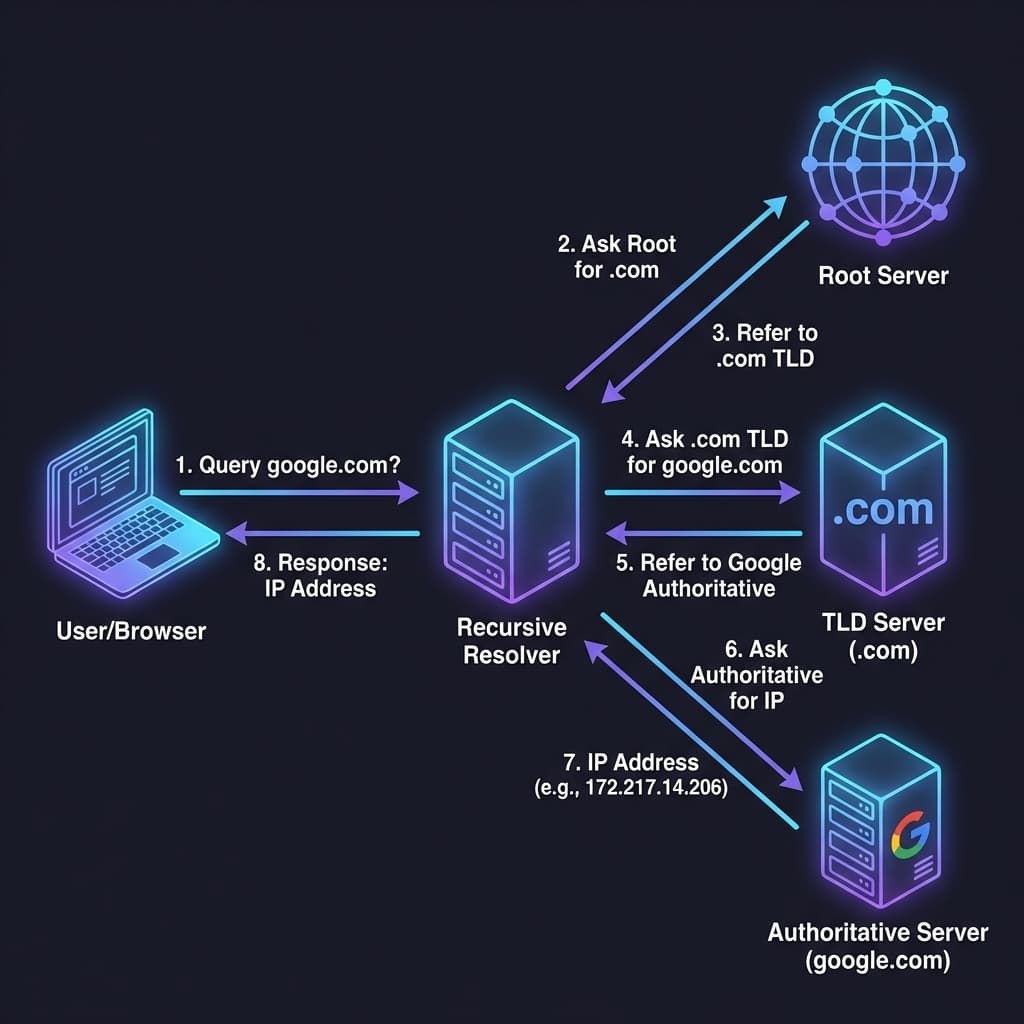
How DNS Resolution Works: A Complete Guide with dig Commands
Understand DNS resolution from root servers to authoritative servers. Learn to use the dig command to trace DNS lookups, understand NS records, and see how your browser finds IP addresses.
12 min read
- DNS
- Networking
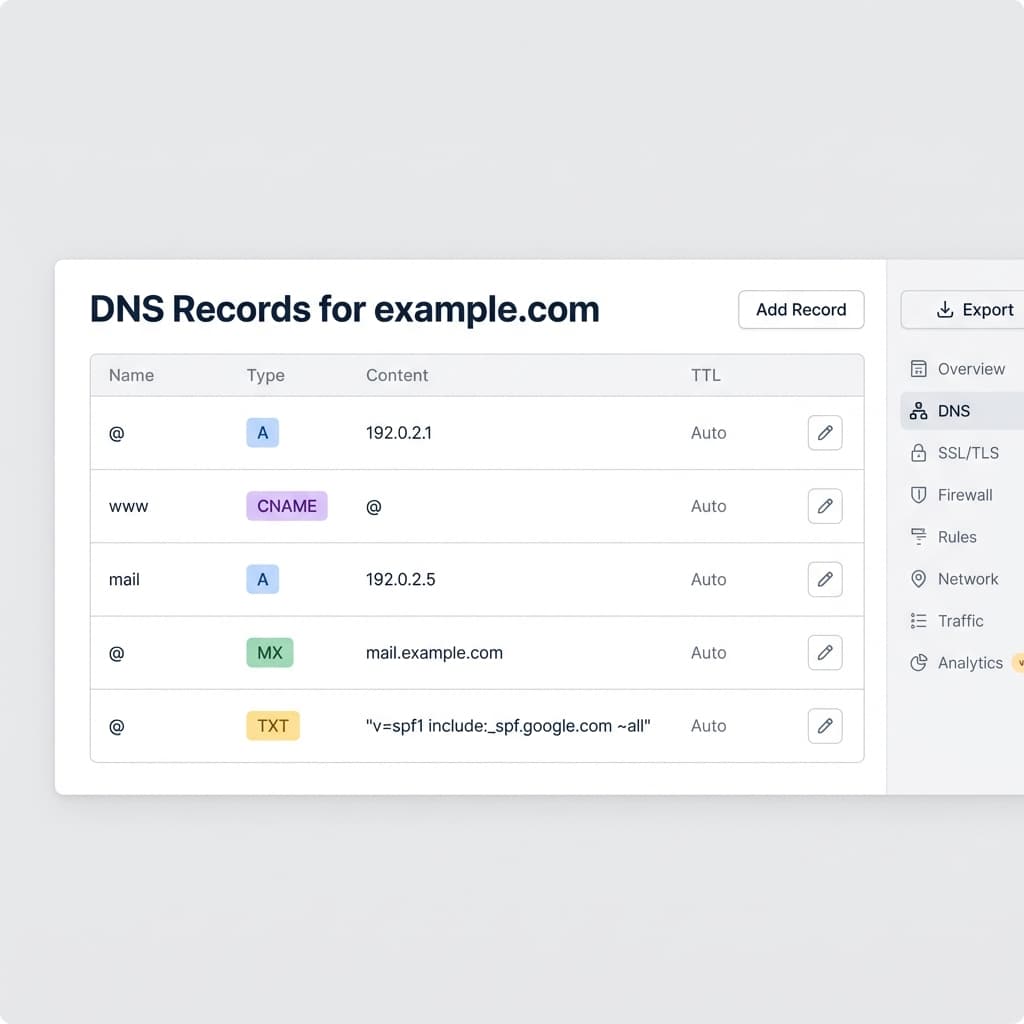
DNS Record Types Explained: A, CNAME, MX, and More
Understand how the internet's phonebook works. A simple guide to A, AAAA, CNAME, MX, and TXT records.
5 min read
- Networking
- TCP
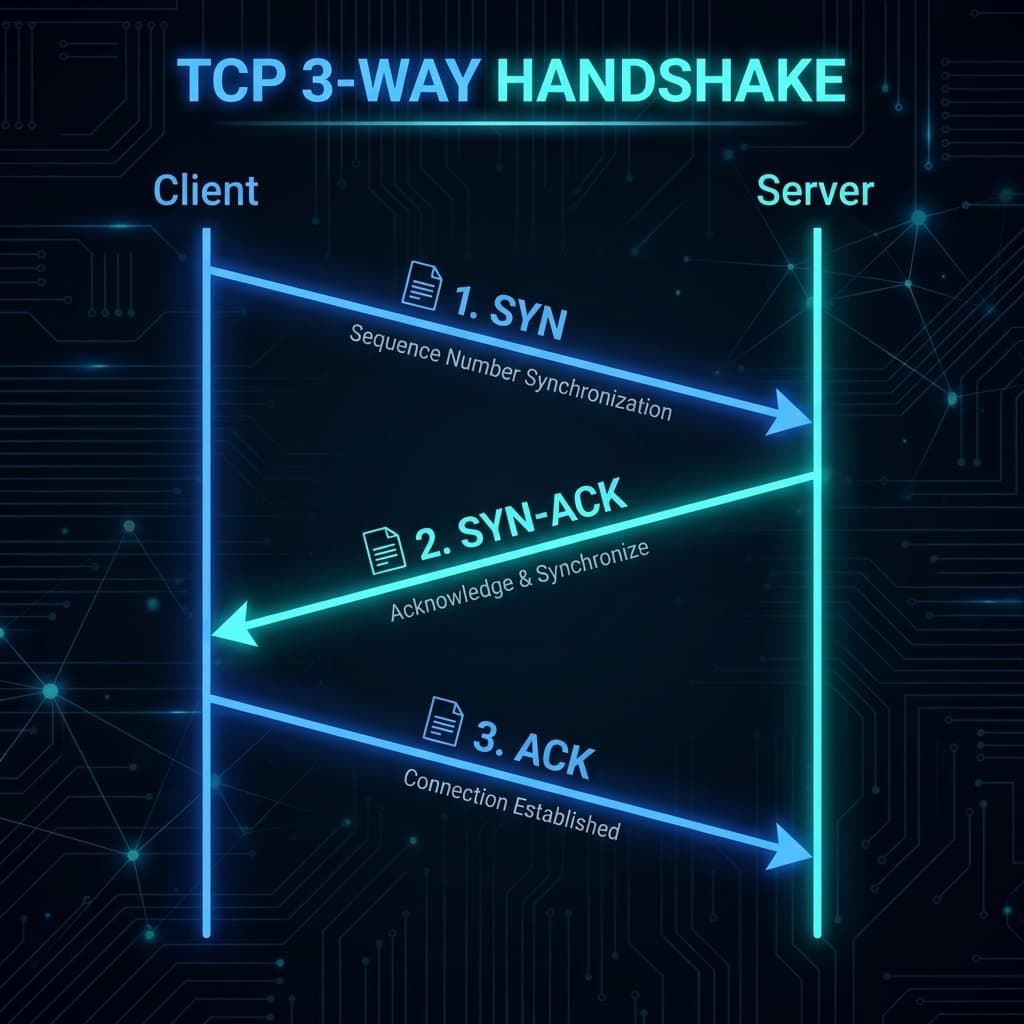
TCP Working: 3-Way Handshake & Reliable Communication Explained
Learn how TCP ensures reliable data transmission over the internet. Understand the 3-way handshake, sequence numbers, acknowledgments, retransmission, and connection termination with clear diagrams.
10 min read