How DNS Resolution Works: A Complete Guide with dig Commands
Understand DNS resolution from root servers to authoritative servers. Learn to use the dig command to trace DNS lookups, understand NS records, and see how your browser finds IP addresses.
12 min read
Share
- What is DNS?
- DNS in Action
- The DNS Hierarchy
- The Three Levels
- How It Works
- What is the `dig` Command?
- Why Use dig?
- Basic Syntax
- Understanding DNS with dig Commands
- Step 1: `dig . NS` – Root Name Servers
- The Command
- What It Returns
- What This Means
- Step 2: `dig com NS` – TLD Name Servers
- The Command
- What It Returns
- What This Means
- Step 3: `dig google.com NS` – Authoritative Name Servers
- The Command
- What It Returns
- What This Means
- Step 4: `dig google.com` – The Final Answer
- The Command
- What It Returns
- Breaking Down the Response
- The Full DNS Resolution Flow
- Step-by-Step Breakdown
- The Recursive Resolver
- Common Resolvers
- What Resolvers Do
- Understanding NS Records
- NS Record Purpose
- Viewing Different Record Types
- Connecting to Browser Requests
- TTL and Caching
- Debugging DNS Issues
- Check if DNS is working
- Trace the full resolution path
- Check specific record types
- Key dig Command Options
- Examples
- Summary Table
- Key Takeaways
- Conclusion
Every time you type google.com in your browser, something magical happens behind the scenes. Your computer has no idea what google.com means – it only understands IP addresses like 142.250.190.78.
So how does it find the right IP? That's the job of DNS – the Domain Name System.
Let's explore how DNS resolution works, and use the dig command to see it in action.
What is DNS?
DNS (Domain Name System) is often called the "phonebook of the internet." It translates human-readable domain names into machine-readable IP addresses.
Why DNS exists
Imagine memorizing 142.250.190.78 instead of google.com.
Now imagine doing that for every website you visit. That's why DNS exists – to let humans use names while computers use numbers.
DNS in Action
| You Type | DNS Returns |
|---|---|
| google.com | 142.250.190.78 |
| amazon.com | 52.94.236.248 |
| github.com | 140.82.121.3 |
The DNS Hierarchy
DNS isn't a single server – it's a distributed, hierarchical system with three main levels:
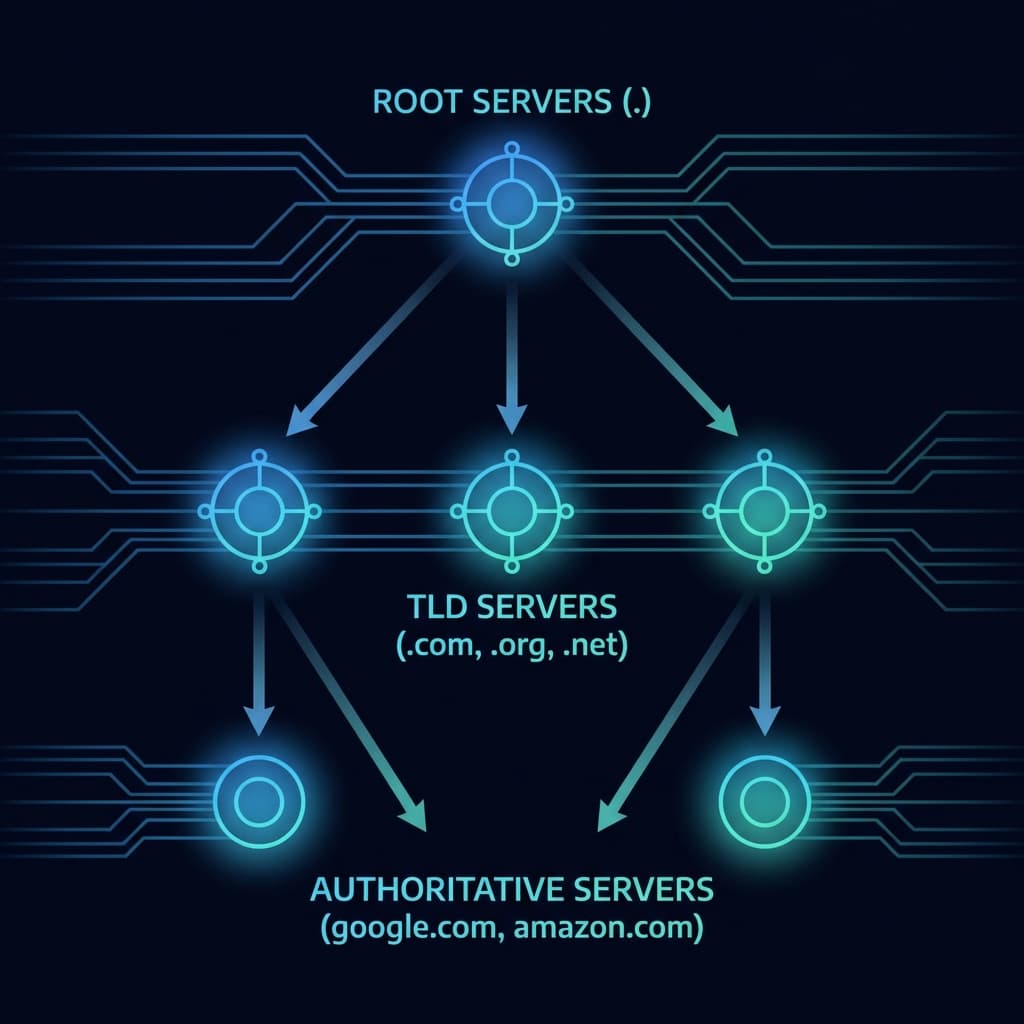 DNS Hierarchy showing Root, TLD, and Authoritative servers
The Three Levels
| Level | Name | Example | Responsibility |
|---|---|---|---|
| 1 | Root Servers | . (dot) | Know where TLD servers are |
| 2 | TLD Servers | .com, .org, .net | Know where domain authorities are |
| 3 | Authoritative Servers | google.com, amazon.com | Know the actual IP addresses |
How It Works
Think of it like asking for directions:
- Root Server: "I don't know where google.com is, but ask the .com people"
- TLD Server: "I don't know google.com's IP, but Google's name servers can help"
- Authoritative Server: "Here's the IP address: 142.250.190.78"
What is the dig Command?
dig (Domain Information Groper) is a DNS diagnostic tool that lets you query DNS servers directly and see the resolution process.
Why Use dig?
| Use Case | Purpose |
|---|---|
| Debugging DNS issues | "Why can't users reach my site?" |
| Verifying DNS changes | "Did my DNS update propagate?" |
| Understanding DNS flow | "How does resolution actually work?" |
| Security auditing | "What DNS records are exposed?" |
Basic Syntax
dig [record_type] [domain] [@server]
Installing dig
Linux/Mac: Usually pre-installed. If not: sudo apt install dnsutils or brew install bind
Windows: Install BIND or use WSL
Understanding DNS with dig Commands
Let's trace DNS resolution step by step using dig, just like a recursive resolver would.
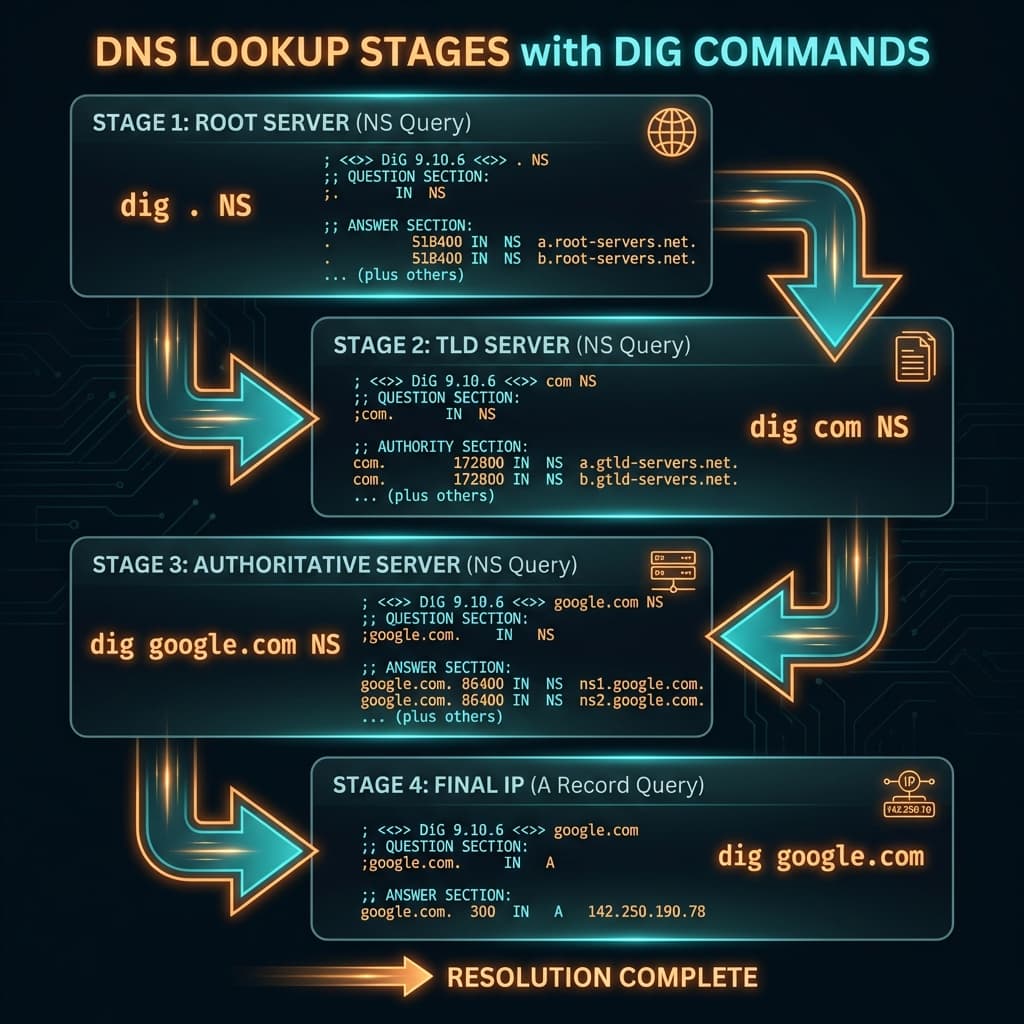 dig commands mapped to DNS lookup stages
Walk the full lookup, one server at a time:
1/4
Step 1: dig . NS – Root Name Servers
The first step is knowing who manages the root of DNS. The root is represented by a single dot (.).
The Command
dig . NS
What It Returns
;; ANSWER SECTION:
.                       518400  IN      NS      a.root-servers.net.
.                       518400  IN      NS      b.root-servers.net.
.                       518400  IN      NS      c.root-servers.net.
.                       518400  IN      NS      d.root-servers.net.
.                       518400  IN      NS      e.root-servers.net.
.                       518400  IN      NS      f.root-servers.net.
.                       518400  IN      NS      g.root-servers.net.
.                       518400  IN      NS      h.root-servers.net.
.                       518400  IN      NS      i.root-servers.net.
.                       518400  IN      NS      j.root-servers.net.
.                       518400  IN      NS      k.root-servers.net.
.                       518400  IN      NS      l.root-servers.net.
.                       518400  IN      NS      m.root-servers.net.
What This Means
| Field | Meaning |
|---|---|
. | The root zone |
518400 | TTL (time-to-live) in seconds – how long to cache |
IN | Internet class |
NS | Name Server record type |
a.root-servers.net. | The actual root server address |
13 Root Servers
There are 13 root server names (a through m), but each is actually a cluster of hundreds of servers worldwide using anycast for redundancy.
Step 2: dig com NS – TLD Name Servers
Next, we discover who manages the .com TLD (Top-Level Domain).
The Command
dig com NS
What It Returns
;; ANSWER SECTION:
com.                    172800  IN      NS      a.gtld-servers.net.
com.                    172800  IN      NS      b.gtld-servers.net.
com.                    172800  IN      NS      c.gtld-servers.net.
com.                    172800  IN      NS      d.gtld-servers.net.
com.                    172800  IN      NS      e.gtld-servers.net.
com.                    172800  IN      NS      f.gtld-servers.net.
com.                    172800  IN      NS      g.gtld-servers.net.
com.                    172800  IN      NS      h.gtld-servers.net.
com.                    172800  IN      NS      i.gtld-servers.net.
com.                    172800  IN      NS      j.gtld-servers.net.
com.                    172800  IN      NS      k.gtld-servers.net.
com.                    172800  IN      NS      l.gtld-servers.net.
com.                    172800  IN      NS      m.gtld-servers.net.
What This Means
These are the gTLD (generic TLD) servers managed by Verisign. They know about every .com domain registered in the world.
When you ask a root server "Where's google.com?", it says:
"I don't know about google.com, but here are the .com servers – ask them."
Step 3: dig google.com NS – Authoritative Name Servers
Now we find out who actually controls the google.com domain – Google's own name servers.
The Command
dig google.com NS
What It Returns
;; ANSWER SECTION:
google.com.             86400   IN      NS      ns1.google.com.
google.com.             86400   IN      NS      ns2.google.com.
google.com.             86400   IN      NS      ns3.google.com.
google.com.             86400   IN      NS      ns4.google.com.
What This Means
These are Google's authoritative name servers. They are the final authority for all DNS records under google.com.
| Server | Purpose |
|---|---|
ns1.google.com | Primary name server |
ns2.google.com | Secondary (redundancy) |
ns3.google.com | Tertiary (redundancy) |
ns4.google.com | Quaternary (redundancy) |
Why multiple name servers?
Redundancy! If one server goes down, others can still answer queries. Most domains have at least 2 name servers.
Step 4: dig google.com – The Final Answer
Now we ask Google's authoritative servers for the actual IP address.
The Command
dig google.com
What It Returns
;; QUESTION SECTION:
;google.com.                    IN      A

;; ANSWER SECTION:
google.com.             300     IN      A       142.250.190.78
Breaking Down the Response
| Field | Meaning |
|---|---|
google.com. | The domain we queried |
300 | TTL – cache for 5 minutes |
IN | Internet class |
A | Address record (IPv4) |
142.250.190.78 | The actual IP address! |
This is it! Your browser now knows where to send HTTP requests.
The Full DNS Resolution Flow
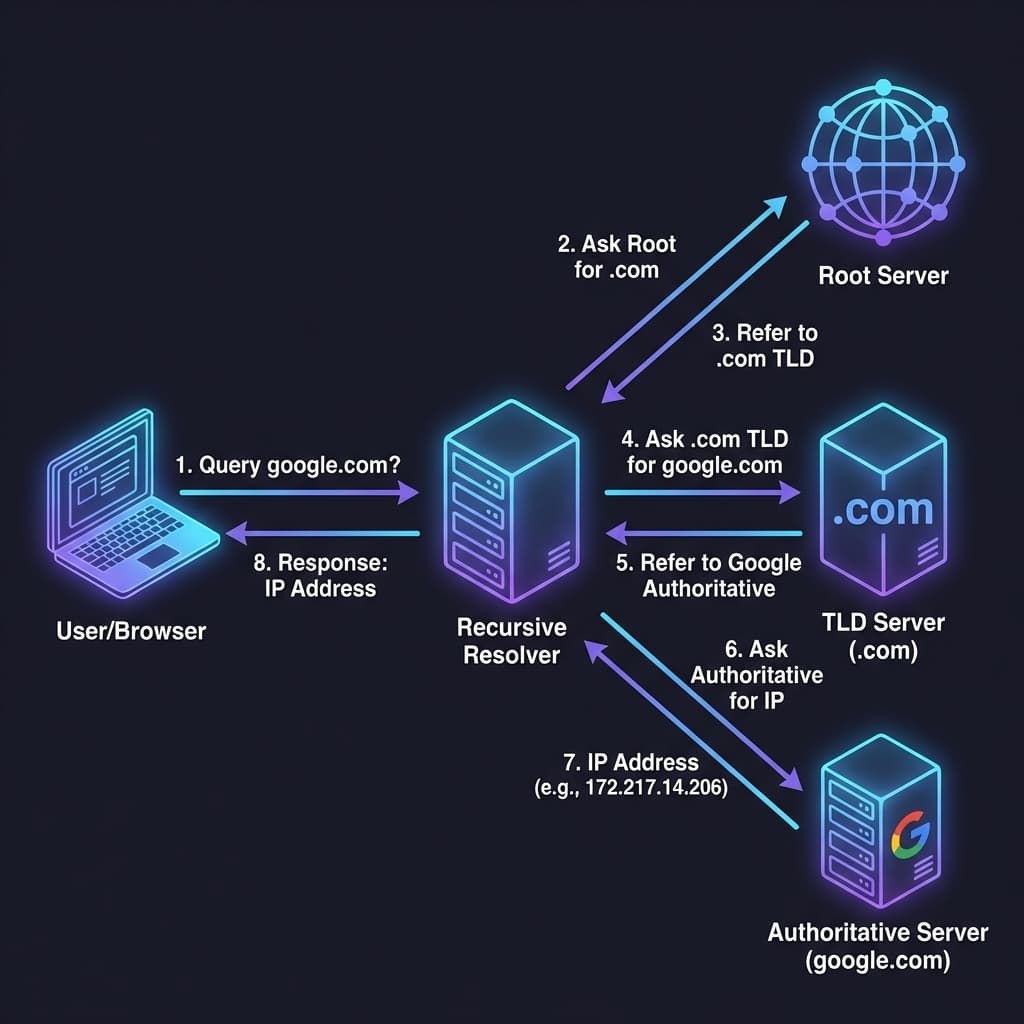
Let's see the complete flow when you type google.com:
Complete DNS resolution flow for google.com
Step-by-Step Breakdown
1. Browser: "What's the IP for google.com?"
   └─→ Sends query to Recursive Resolver (e.g., 8.8.8.8)

2. Resolver: "Let me check my cache... not found. Ask root servers."
   └─→ Query: "Where's .com?"

3. Root Server: "Here are the .com TLD servers"
   └─→ Returns: a.gtld-servers.net, b.gtld-servers.net, etc.

4. Resolver: "Ask .com TLD server"
   └─→ Query: "Where's google.com?"

5. TLD Server: "Here are Google's authoritative servers"
   └─→ Returns: ns1.google.com, ns2.google.com, etc.

6. Resolver: "Ask Google's name server"
   └─→ Query: "What's the IP for google.com?"

7. Authoritative Server: "Here's the IP!"
   └─→ Returns: 142.250.190.78

8. Resolver: "Caches the answer and returns to browser"
   └─→ Browser connects to 142.250.190.78
The Recursive Resolver
The recursive resolver does all the heavy lifting. Your computer doesn't query root servers directly – it asks its configured resolver.
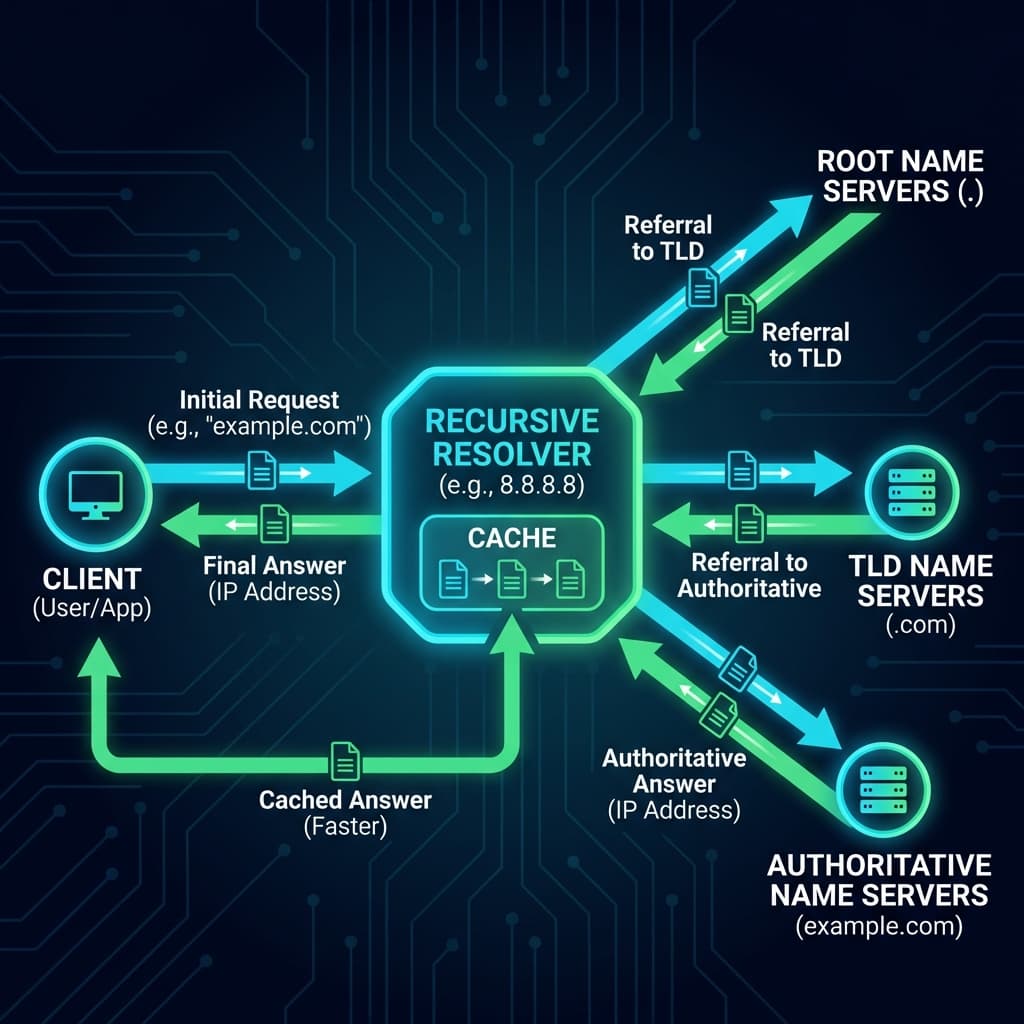 Recursive resolver interaction with all DNS server levels
Common Resolvers
| Resolver | IP Address | Provider |
|---|---|---|
| Google DNS | 8.8.8.8, 8.8.4.4 | |
| Cloudflare | 1.1.1.1, 1.0.0.1 | Cloudflare |
| OpenDNS | 208.67.222.222 | Cisco |
| Your ISP | Varies | ISP-provided |
What Resolvers Do
- Receive queries from clients (your computer)
- Check cache – maybe we already know the answer
- Recursively query root → TLD → authoritative if needed
- Cache the response for the TTL duration
- Return answer to the client
Caching is key
DNS caching drastically reduces load on name servers. If the resolver recently looked up google.com, it won't need to do the full resolution again until the TTL expires.
Understanding NS Records
NS (Name Server) records are the backbone of DNS delegation. They tell the world "these servers are authoritative for this domain."
NS Record Purpose
| Record Type | Question Answered |
|---|---|
| NS | "Who is authoritative for this domain?" |
| A | "What is the IPv4 address?" |
| AAAA | "What is the IPv6 address?" |
| CNAME | "What is the canonical name (alias)?" |
| MX | "Where should email go?" |
| TXT | "What arbitrary text info exists?" |
Viewing Different Record Types
# A record (IPv4)
dig google.com A

# AAAA record (IPv6)
dig google.com AAAA

# MX records (mail servers)
dig google.com MX

# TXT records (SPF, DKIM, etc.)
dig google.com TXT

# All records
dig google.com ANY
Connecting to Browser Requests
When you type https://google.com and press Enter:
1. Browser checks local DNS cache
   └─→ Not found

2. Browser asks OS for resolution
   └─→ OS checks its cache, hosts file
   └─→ Not found, asks configured resolver

3. Resolver does full lookup if needed
   └─→ Returns: 142.250.190.78

4. Browser establishes TCP connection
   └─→ TCP 3-way handshake to 142.250.190.78:443

5. Browser sends HTTPS request
   └─→ TLS handshake, then HTTP GET /

6. Server responds
   └─→ Google's webpage loads
TTL and Caching
Each DNS response includes a TTL (Time To Live). During this time, the cached answer is used without re-querying.
| TTL Value | Caching Duration | Use Case |
|---|---|---|
| 300 (5 min) | Short, frequent updates | Dynamic services |
| 3600 (1 hour) | Moderate | Most websites |
| 86400 (1 day) | Long, stable records | Rarely-changing domains |
Debugging DNS Issues
Check if DNS is working
# Query with specific resolver
dig google.com @8.8.8.8

# Check propagation across resolvers
dig google.com @1.1.1.1
dig google.com @8.8.8.8
dig google.com @208.67.222.222
Trace the full resolution path
# +trace shows each step
dig google.com +trace
Check specific record types
# Check MX records for email issues
dig yourdomain.com MX

# Check TXT for SPF/DKIM
dig yourdomain.com TXT
DNS Propagation
DNS changes can take up to 48 hours to propagate globally due to caching. Always set low TTLs before making changes!
Key dig Command Options
| Option | Purpose |
|---|---|
+short | Show only the answer, no metadata |
+trace | Show full resolution path |
+noall +answer | Show only answer section |
@server | Query specific DNS server |
-x IP | Reverse DNS lookup |
Examples
# Just get the IP
dig google.com +short

# Full trace
dig google.com +trace

# Query specific server
dig google.com @8.8.8.8

# Reverse lookup
dig -x 142.250.190.78
Summary Table
| Command | What It Shows |
|---|---|
dig . NS | Root name servers |
dig com NS | .com TLD name servers |
dig google.com NS | Google's authoritative servers |
dig google.com | The actual IP address |
dig google.com +trace | Complete resolution path |
Key Takeaways
Remember These
- DNS translates domain names to IP addresses
- Hierarchy: Root → TLD → Authoritative servers
- NS records point to authoritative name servers
- Recursive resolvers (8.8.8.8, 1.1.1.1) do the heavy lifting
- dig is your diagnostic tool for DNS troubleshooting
- Caching (TTL) reduces DNS queries dramatically
- Every browser request starts with DNS resolution
Conclusion
DNS is foundational to how the internet works. Every request – whether from a browser, API, or microservice – starts with DNS resolution.
Understanding DNS helps you:
- Debug "site not reachable" issues
- Manage domain configurations
- Design systems with DNS-based load balancing
- Understand CDN and global traffic routing
Next time something isn't connecting, reach for dig first. It might just reveal the answer.
Happy resolving! 🌐
Have questions about DNS? Drop a comment or reach out on Twitter @srtenginamath!

Written by Sharanayya R Tenginamath
Software Engineer at McD BERL with 4 years building scalable full-stack applications with React.js, Next.js, TypeScript, FastAPI and Python. Available to join from Oct 12, 2026.
Related articles
- DNS
- Networking
DNS Record Types Explained: A, CNAME, MX, and More
Understand how the internet's phonebook works. A simple guide to A, AAAA, CNAME, MX, and TXT records.
5 min read
- Networking
- Infrastructure
Understanding Network Devices: Modem, Router, Switch, Firewall & Load Balancer
Learn how network devices work together to connect you to the internet. Understand modems, routers, switches, hubs, firewalls, and load balancers with real-world analogies and diagrams.
11 min read
- Networking
- TCP
TCP Working: 3-Way Handshake & Reliable Communication Explained
Learn how TCP ensures reliable data transmission over the internet. Understand the 3-way handshake, sequence numbers, acknowledgments, retransmission, and connection termination with clear diagrams.
10 min read