JavaScript Operators — The Basics You Need to Know
Master JavaScript operators — arithmetic, comparison, logical, and assignment — with real-world examples, visual diagrams, truth tables, and hands-on assignments. A practical guide from 4+ years of full-stack development.
19 min read
Share
- What Are Operators?
- Arithmetic Operators — Doing Math
- The Big Five
- Understanding Modulus (`%`)
- Real-World Example: Building a Simple Calculator
- The String `+` Gotcha
- Comparison Operators — Comparing Values
- Basic Comparisons
- Complete Comparison Operators Table
- `==` vs `===` — The Most Important Difference
- `==` (Loose Equality) — Converts Types First
- `===` (Strict Equality) — No Conversion, No Surprises
- Real-World Example: Form Validation
- Logical Operators — Making Decisions
- The Three Logical Operators
- Truth Table — Visual Reference
- `&&` (AND) — Both Must Be True
- `||` (OR) — At Least One Must Be True
- `||` for Default Values (Common Pattern)
- `!` (NOT) — Flip the Value
- `!!` — Convert to Boolean (Double NOT)
- Combining Logical Operators
- Assignment Operators — Storing Values
- The `=` Operator (Basic Assignment)
- Compound Assignment Operators
- Complete Assignment Operators Table
- Real-World Example: Game Score Tracker
- Hands-On Assignment
- Task 1: Arithmetic Operations
- Task 2: Comparison with `==` vs `===`
- Task 3: Logical Operators in Action
- Task 4: Assignment Operators — Score Tracker
- Common Mistakes to Avoid
- Mistake 1: Using `=` Instead of `===` in Conditions
- Mistake 2: String + Number Confusion
- Mistake 3: Forgetting Short-Circuit Evaluation
- Mistake 4: Division by Zero
- Quick Reference Cheat Sheet
- Arithmetic
- Comparison
- Logical
- Assignment
- Key Takeaways
- What's Next?
You've learned about variables and data types — now it's time to do things with them. Operators are how you perform calculations, compare values, make decisions, and assign results.
After 4+ years of building production applications, I can say this: understanding operators deeply prevents entire categories of bugs — especially the difference between == and ===, which still catches experienced developers off guard.
Let's master them all.
What Are Operators?
An operator is a special symbol that performs an operation on one or more values (called operands) and produces a result.
Think of Operators Like Verbs
If variables are nouns (things), then operators are verbs (actions). They tell JavaScript what to do with the data.
+→ add these numbers===→ check if these values are equal&&→ verify that both conditions are true
Here's a simple example:
let result = 10 + 5; // + is the operator, 10 and 5 are operands
console.log(result); // 15
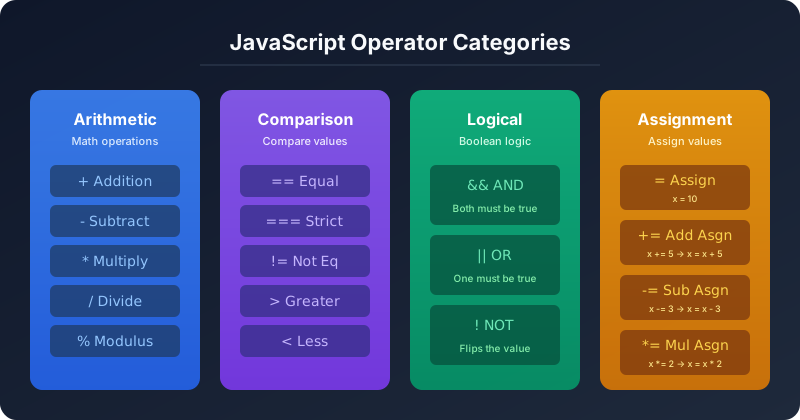
JavaScript has four main categories of operators that you'll use daily:
JavaScript operator categories — Arithmetic, Comparison, Logical, and Assignment
Let's explore each one.
Arithmetic Operators — Doing Math
Arithmetic operators perform mathematical calculations. If you've used a calculator, you already know these.
The Big Five
let a = 20;
let b = 7;

console.log(a + b);   // 27  → Addition
console.log(a - b);   // 13  → Subtraction
console.log(a * b);   // 140 → Multiplication
console.log(a / b);   // 2.857142857142857 → Division
console.log(a % b);   // 6   → Modulus (remainder)
Understanding Modulus (%)
The modulus operator gives you the remainder after division. This one trips up beginners, but it's incredibly useful:
console.log(10 % 3);  // 1  → 10 ÷ 3 = 3 remainder 1
console.log(15 % 5);  // 0  → 15 ÷ 5 = 3 remainder 0
console.log(7 % 2);   // 1  → 7 ÷ 2 = 3 remainder 1
When Do You Use Modulus in Real Code?
I use % constantly in production code:
- Check if a number is even or odd:
number % 2 === 0→ even - Cycle through items:
index % arrayLength→ loops back to 0 - Stripe table rows:
rowIndex % 2 === 0→ alternate colors - Pagination:
totalItems % pageSize→ remaining items on last page
Real-World Example: Building a Simple Calculator
const price = 1499;
const quantity = 3;
const discount = 10; // 10% discount

// Calculate total
const subtotal = price * quantity;
const discountAmount = subtotal * (discount / 100);
const total = subtotal - discountAmount;

console.log(`Subtotal: ₹${subtotal}`);        // Subtotal: ₹4497
console.log(`Discount: -₹${discountAmount}`); // Discount: -₹449.7
console.log(`Total: ₹${total}`);              // Total: ₹4047.3
The String + Gotcha
The + operator does double duty — it adds numbers AND concatenates strings. This causes one of JavaScript's most common bugs:
// Number + Number = Addition ✅
console.log(5 + 3);         // 8

// String + String = Concatenation ✅
console.log("Hello" + " " + "World");  // "Hello World"

// String + Number = String Concatenation ⚠️
console.log("5" + 3);       // "53"  ← NOT 8!
console.log("Age: " + 25);  // "Age: 25"

// Fix: Convert string to number first
console.log(Number("5") + 3);    // 8 ✅
console.log(parseInt("5") + 3);  // 8 ✅
The + Trap That Gets Everyone
When any operand is a string, + switches to concatenation mode. This is the #1 source of unexpected NaN and weird string results in JavaScript. Always ensure your values are the correct type before doing math.
Comparison Operators — Comparing Values
Comparison operators compare two values and return a boolean (true or false). They're the building blocks of all if/else decisions in your code.
Basic Comparisons
let age = 25;

console.log(age > 18);    // true  → greater than
console.log(age < 18);    // false → less than
console.log(age >= 25);   // true  → greater than or equal
console.log(age <= 24);   // false → less than or equal
Complete Comparison Operators Table
| Operator | Name | Example | Result | Description |
|---|---|---|---|---|
== | Loose Equality | 5 == "5" | true | Compares values after type conversion |
=== | Strict Equality | 5 === "5" | false | Compares value and type — no conversion |
!= | Loose Inequality | 5 != "5" | false | Opposite of == |
!== | Strict Inequality | 5 !== "5" | true | Opposite of === |
> | Greater Than | 10 > 5 | true | Left is bigger than right |
< | Less Than | 3 < 7 | true | Left is smaller than right |
>= | Greater or Equal | 5 >= 5 | true | Left is bigger or equal |
<= | Less or Equal | 4 <= 3 | false | Left is smaller or equal |
== vs === — The Most Important Difference
This is the single most important thing in this entire article. Understanding this difference will save you hours of debugging.
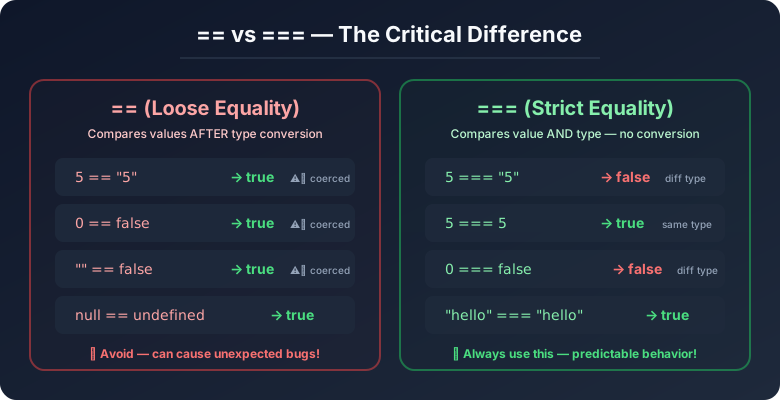 Comparison of == (loose equality) vs === (strict equality) with examples
== (Loose Equality) — Converts Types First
The == operator tries to be "helpful" by converting (coercing) the types before comparing:
console.log(5 == "5");        // true  😱 — string "5" converted to number 5
console.log(0 == false);      // true  😱 — false converted to 0
console.log("" == false);     // true  😱 — both become 0
console.log(null == undefined); // true 😱 — special JS rule
console.log("0" == false);   // true  😱 — "0" → 0, false → 0
=== (Strict Equality) — No Conversion, No Surprises
The === operator checks both the value AND the type. No coercion, no surprises:
console.log(5 === "5");        // false ✅ — number ≠ string
console.log(0 === false);      // false ✅ — number ≠ boolean
console.log("" === false);     // false ✅ — string ≠ boolean
console.log(null === undefined); // false ✅ — different types
console.log(5 === 5);          // true  ✅ — same value, same type
console.log("hello" === "hello"); // true ✅ — same value, same type
Golden Rule: Always Use ===
In my 4+ years of professional development, I have never had a legitimate reason to use ==. Every codebase I've worked on has an ESLint rule that forbids == entirely.
// ❌ Never do this
if (userInput == 0) { ... }

// ✅ Always do this
if (userInput === 0) { ... }
The only exception is null == undefined, but even that has cleaner alternatives.
Real-World Example: Form Validation
const userAge = document.getElementById("age").value; // Returns a STRING!

// ❌ Bug-prone — "0" == false is true!
if (userAge == false) {
    console.log("No age entered");
}

// ✅ Correct approach
if (userAge === "" || userAge === null) {
    console.log("No age entered");
}

// ✅ Converting properly before comparing
const age = Number(userAge);
if (age >= 18) {
    console.log("Access granted");
}
Precedence decides the answer. Step through one expression:
1/5
Logical Operators — Making Decisions
Logical operators let you combine multiple conditions. They're the backbone of every if statement, form validation, and access control check you'll ever write.
The Three Logical Operators
| Operator | Name | What It Does | Example |
|---|---|---|---|
&& | AND | Returns true if both sides are true | true && true → true |
|| | OR | Returns true if at least one side is true | false || true → true |
! | NOT | Flips the boolean value | !true → false |
Truth Table — Visual Reference
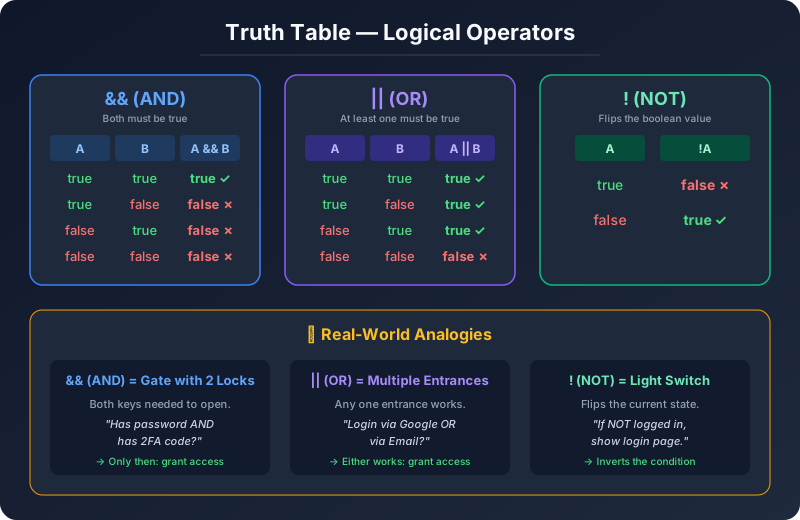 Truth table for logical operators AND, OR, and NOT with real-world analogies
&& (AND) — Both Must Be True
Think of it as a security checkpoint with two guards — both must approve:
let isLoggedIn = true;
let hasPermission = true;

// Both conditions must be true
if (isLoggedIn && hasPermission) {
    console.log("✅ Access granted!");
}

// Real-world: E-commerce checkout
let hasItems = true;
let hasPaymentMethod = true;
let isAddressValid = true;

if (hasItems && hasPaymentMethod && isAddressValid) {
    console.log("✅ Ready to place order!");
} else {
    console.log("❌ Please complete all steps.");
}
|| (OR) — At Least One Must Be True
Think of it as multiple entrances — any one will work:
let isAdmin = false;
let isModerator = true;

// Either condition can be true
if (isAdmin || isModerator) {
    console.log("✅ Can access dashboard");
}

// Real-world: Login options
let hasGoogleAuth = false;
let hasEmailAuth = true;
let hasPhoneAuth = false;

if (hasGoogleAuth || hasEmailAuth || hasPhoneAuth) {
    console.log("✅ User can log in!");
}
|| for Default Values (Common Pattern)
This is a pattern you'll see in every production codebase:
// If userName is empty/null/undefined, use "Guest"
let userName = null;
let displayName = userName || "Guest";
console.log(displayName); // "Guest"

// Another common use: default configuration
let userTheme = undefined;
let theme = userTheme || "dark";
console.log(theme); // "dark"

// API response fallback
let apiData = null;
let data = apiData || { items: [], total: 0 };
console.log(data); // { items: [], total: 0 }
Modern Alternative: Nullish Coalescing (??)
ES2020 introduced ?? which only falls back for null or undefined — not for 0, "", or false:
let count = 0;
console.log(count || 10);   // 10  ← Oops! 0 is "falsy"
console.log(count ?? 10);   // 0   ← Correct! 0 is a valid value
Use ?? when 0 or "" are valid values.
! (NOT) — Flip the Value
Think of it as a light switch — it flips whatever state you have:
let isOnline = true;
console.log(!isOnline);   // false
console.log(!false);      // true

// Real-world: Toggle visibility
let isMenuOpen = false;
isMenuOpen = !isMenuOpen;  // Flip to true (open the menu)
console.log(isMenuOpen);   // true

isMenuOpen = !isMenuOpen;  // Flip to false (close the menu)
console.log(isMenuOpen);   // false
!! — Convert to Boolean (Double NOT)
Another common production pattern:
// Convert any value to its boolean equivalent
console.log(!!"hello");    // true  — non-empty string is truthy
console.log(!!"");         // false — empty string is falsy
console.log(!!0);          // false — zero is falsy
console.log(!!42);         // true  — non-zero number is truthy
console.log(!!null);       // false — null is falsy
console.log(!!undefined);  // false — undefined is falsy

// Practical use: Check if user exists
let user = { name: "Sharan" };
let isAuthenticated = !!user;
console.log(isAuthenticated); // true
Combining Logical Operators
let age = 25;
let hasLicense = true;
let hasInsurance = true;

// Complex condition: must be 18+, have license AND insurance
if (age >= 18 && hasLicense && hasInsurance) {
    console.log("✅ You can drive!");
}

// With OR: underage OR no license → cannot drive
if (age < 18 || !hasLicense) {
    console.log("❌ Cannot drive");
}

// Mixed: admin bypass OR (age check AND license check)
let isAdmin = false;
if (isAdmin || (age >= 18 && hasLicense)) {
    console.log("✅ Approved");
}
Parentheses Matter!
Use parentheses () to make complex conditions readable. JavaScript evaluates && before ||, but explicit parentheses prevent confusion:
// ⚠️ Confusing — what runs first?
if (a || b && c) { ... }

// ✅ Clear — parentheses show intent
if (a || (b && c)) { ... }
if ((a || b) && c) { ... }
Assignment Operators — Storing Values
Assignment operators store values in variables. You've already seen =, but there are handy shorthand versions that professional developers use everywhere.
The = Operator (Basic Assignment)
let score = 0;          // Assign initial value
let playerName = "Sharan";
let isGameOver = false;
Compound Assignment Operators
These are shortcuts that combine an arithmetic operation with assignment:
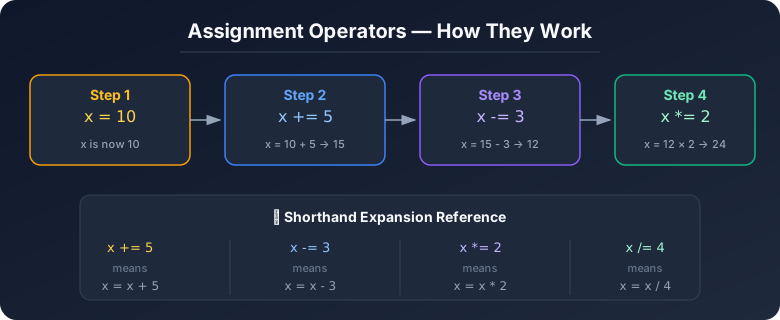 Assignment operators — how they work step by step
let score = 100;

score += 25;   // score = score + 25  → 125
console.log(score); // 125

score -= 10;   // score = score - 10  → 115
console.log(score); // 115

score *= 2;    // score = score * 2   → 230
console.log(score); // 230

score /= 5;    // score = score / 5   → 46
console.log(score); // 46

score %= 10;   // score = score % 10  → 6
console.log(score); // 6
Complete Assignment Operators Table
| Operator | Example | Equivalent To | Description |
|---|---|---|---|
= | x = 10 | x = 10 | Assign value |
+= | x += 5 | x = x + 5 | Add and assign |
-= | x -= 3 | x = x - 3 | Subtract and assign |
*= | x *= 2 | x = x * 2 | Multiply and assign |
/= | x /= 4 | x = x / 4 | Divide and assign |
%= | x %= 3 | x = x % 3 | Modulus and assign |
Real-World Example: Game Score Tracker
let playerScore = 0;

// Player collects coins
playerScore += 10;   // Found a coin!      → 10
playerScore += 10;   // Another coin!      → 20
playerScore += 50;   // Found a treasure!  → 70

// Player takes damage
playerScore -= 15;   // Hit by enemy!      → 55

// Double points power-up!
playerScore *= 2;    // Bonus activated!   → 110

console.log(`Final Score: ${playerScore}`); // Final Score: 110
Why Use Shorthand?
Shorthand operators aren't just about saving keystrokes — they make code cleaner and less error-prone:
// ❌ Repetitive — you write the variable name twice
totalPrice = totalPrice + itemPrice;
attempts = attempts - 1;

// ✅ Clean — shorter, fewer chances for typos
totalPrice += itemPrice;
attempts -= 1;
In a large codebase, this adds up fast. Every senior developer uses shorthand.
Hands-On Assignment
Time to put it all together! Create a file called operators.js and work through these tasks:
Task 1: Arithmetic Operations
// Create two number variables and perform all arithmetic operations
let num1 = 24;
let num2 = 7;

console.log("--- Arithmetic Operators ---");
console.log(`${num1} + ${num2} = ${num1 + num2}`);   // 31
console.log(`${num1} - ${num2} = ${num1 - num2}`);   // 17
console.log(`${num1} * ${num2} = ${num1 * num2}`);   // 168
console.log(`${num1} / ${num2} = ${num1 / num2}`);   // 3.4285...
console.log(`${num1} % ${num2} = ${num1 % num2}`);   // 3

// Bonus: Check if num1 is even or odd
console.log(`Is ${num1} even? ${num1 % 2 === 0}`);   // true
Task 2: Comparison with == vs ===
console.log("\n--- == vs === ---");

// Test these and predict the output BEFORE running!
console.log(5 == "5");          // ?
console.log(5 === "5");         // ?
console.log(0 == false);        // ?
console.log(0 === false);       // ?
console.log("" == false);       // ?
console.log("" === false);      // ?
console.log(null == undefined); // ?
console.log(null === undefined);// ?

// Check your answers — were you surprised by any?
Task 3: Logical Operators in Action
console.log("\n--- Logical Operators ---");

let temperature = 28;
let isWeekend = true;
let hasUmbrella = false;

// Use && (AND)
let perfectForPicnic = temperature > 20 && isWeekend && !hasUmbrella;
console.log(`Perfect for picnic? ${perfectForPicnic}`);
// Think: What would change if temperature was 15?

// Use || (OR)
let stayHome = temperature < 10 || !isWeekend;
console.log(`Should stay home? ${stayHome}`);

// Use ! (NOT)
let isNotWeekend = !isWeekend;
console.log(`Is it a weekday? ${isNotWeekend}`);

// Challenge: Write a condition for "go swimming"
// Rules: temperature > 30 AND (isWeekend OR hasDayOff)
let hasDayOff = true;
let goSwimming = temperature > 30 && (isWeekend || hasDayOff);
console.log(`Go swimming? ${goSwimming}`);
Task 4: Assignment Operators — Score Tracker
console.log("\n--- Assignment Operators ---");

let wallet = 1000;
console.log(`Starting balance: ₹${wallet}`);

wallet -= 250;   // Bought groceries
console.log(`After groceries: ₹${wallet}`);

wallet += 500;   // Got salary bonus
console.log(`After bonus: ₹${wallet}`);

wallet *= 1.05;  // 5% interest earned
console.log(`After interest: ₹${wallet.toFixed(2)}`);

wallet /= 2;     // Split with roommate
console.log(`After splitting: ₹${wallet.toFixed(2)}`);

// Final balance
console.log(`\n💰 Final balance: ₹${wallet.toFixed(2)}`);
How to Run This
- Create a file called
operators.js - Paste the code above
- Open your terminal
- Run:
node operators.js
Or use the browser console: Press F12 → Console tab → Paste and run!
Common Mistakes to Avoid
Mistake 1: Using = Instead of === in Conditions
let x = 10;

// ❌ This ASSIGNS 5 to x, doesn't compare!
if (x = 5) {
    console.log("This always runs!"); // x is now 5, which is truthy
}

// ✅ This COMPARES x to 5
if (x === 5) {
    console.log("x is 5");
}
Mistake 2: String + Number Confusion
// ❌ Bug: form values are always strings!
let price = "100";
let tax = 10;
let total = price + tax;
console.log(total); // "10010" — string concatenation, not math!

// ✅ Fix: convert the string to a number
let total = Number(price) + tax;
console.log(total); // 110
Mistake 3: Forgetting Short-Circuit Evaluation
// && stops at the FIRST false value
console.log(false && "hello");  // false — never reaches "hello"
console.log(true && "hello");   // "hello" — both are truthy

// || stops at the FIRST true value
console.log("hello" || "world"); // "hello" — already truthy
console.log(false || "world");   // "world" — first was falsy
console.log(0 || "" || "fallback"); // "fallback"
Mistake 4: Division by Zero
console.log(10 / 0);   // Infinity (not an error!)
console.log(-10 / 0);  // -Infinity
console.log(0 / 0);    // NaN (Not a Number)

// ✅ Always check before dividing
let divisor = 0;
if (divisor !== 0) {
    console.log(100 / divisor);
} else {
    console.log("Cannot divide by zero!");
}
Quick Reference Cheat Sheet
Arithmetic
10 + 3    // 13    Addition
10 - 3    // 7     Subtraction
10 * 3    // 30    Multiplication
10 / 3    // 3.33  Division
10 % 3    // 1     Remainder (Modulus)
Comparison
5 === 5    // true   Strict equal (USE THIS!)
5 !== "5"  // true   Strict not equal
5 > 3      // true   Greater than
5 < 3      // false  Less than
5 >= 5     // true   Greater than or equal
5 <= 4     // false  Less than or equal
Logical
true && true    // true    AND (both must be true)
true || false   // true    OR (one must be true)
!true           // false   NOT (flips the value)
Assignment
x = 10     // Assign
x += 5     // x = x + 5
x -= 3     // x = x - 3
x *= 2     // x = x * 2
x /= 4     // x = x / 4
x %= 3     // x = x % 3
Key Takeaways
Remember These
- Arithmetic operators (
+,-,*,/,%) perform math — watch out for the+string concatenation trap - Always use
===(strict equality) — never==(loose equality) — this prevents entire categories of bugs - Logical operators (
&&,||,!) combine conditions —&&means "all must be true",||means "at least one" - Assignment shorthand (
+=,-=,*=) makes code cleaner and less error-prone - Use
||for default values — and??(nullish coalescing) when0or""are valid - Parentheses clarify complex conditions — always use them for readability
- Type matters — convert strings to numbers before doing math with
Number()orparseInt()
What's Next?
Now that you understand operators, you're ready for decision-making and flow control:
- Conditional Statements — using
if/elseandswitchto control program flow - Loops — repeating actions with
for,while, anddo...while - Functions — creating reusable blocks of code
- Arrays and Objects — working with collections of data
Operators are the verbs of programming — they make your data come alive. Practice the assignment above until these patterns feel natural.
Happy coding! 🚀
Have questions about JavaScript operators? Drop a comment or reach out on Twitter @srtenginamath!

Written by Sharanayya R Tenginamath
Software Engineer at McD BERL with 4 years building scalable full-stack applications with React.js, Next.js, TypeScript, FastAPI and Python. Available to join from Oct 12, 2026.
Related articles
- JavaScript
- Web Development
Understanding Variables and Data Types in JavaScript — The Complete Beginner's Guide
Learn JavaScript variables (var, let, const) and data types with real-life analogies, clear code examples, comparison diagrams, and hands-on assignments. A practical guide written from 4+ years of full-stack development experience.
15 min read
- JavaScript
- Async
JavaScript Promises : The Complete Guide to Async Code
Master JavaScript Promises from scratch — lifecycle, .then()/.catch()/.finally(), all static methods (all, allSettled, race, any), real-world examples, visual diagrams, and hands-on assignments. Written from 4+ years of full-stack development experience.
17 min read
- CSS
- Web Development
CSS Selectors 101: Targeting Elements with Precision
Master CSS selectors from basics to advanced. Learn element, class, ID, group, and descendant selectors with practical examples. Build a solid foundation for styling web pages.
11 min read