RAG Explained: How to Make an LLM Answer From Your Own Data
A practical guide to Retrieval-Augmented Generation — chunking, embeddings, vector search, and prompt assembly — with runnable Python, architecture diagrams, and the mistakes that break RAG in production.
13 min read
Share
- The Real-Life Analogy: Running a Mobile Shop
- What Is RAG, Structurally?
- Why Not Just Fine-Tune?
- Stage 1: Chunking
- Why Chunks Must Overlap
- Stage 2: Embeddings
- Stage 3: Vector Storage and Retrieval
- Stage 4: Prompt Assembly
- Common Mistakes to Avoid
- Mistake 1: Assuming Retrieval Failure Is a Model Problem
- Mistake 2: Chunking on Character Count Alone
- Mistake 3: Forgetting to Re-Index Updated Documents
- Mistake 4: No Citations
- Hands-On Assignment — Build a Shop FAQ Bot
- Task 1: Chunk a Document
- Task 2: Embed and Retrieve
- Task 3: Prove the Guardrail Works
- Key Takeaways
- What's Next?
Ask ChatGPT about your company's refund policy and it will confidently invent one. Not because the model is broken — because it has never seen your policy document. It is answering from patterns in public text, and your internal PDF was never part of that.
Retrieval-Augmented Generation (RAG) is how you fix this without retraining anything. After 4+ years of full-stack development, RAG is the pattern I reach for most often when a product needs an LLM to answer from private data — because it's cheap, it updates instantly, and you can point at exactly which document produced an answer.
By the end of this post you will understand every stage of a RAG pipeline, know why each one exists, and have working code for the two stages people get wrong most often.
The Real-Life Analogy: Running a Mobile Shop
Imagine you run a mobile accessories shop in Bengaluru. A customer asks:
"Anna, is there any warranty on this charger?"
You do not memorise every warranty clause of every product you stock. That would be absurd. Instead you:
- Recognise which product they mean
- Walk to the shelf where that product's paperwork lives
- Pull out the one relevant page
- Read it, and answer in your own words
That is RAG, exactly. The LLM is the shop assistant — fluent, good at explaining, but with no memory of your paperwork. The retrieval step is walking to the right shelf. Keep this shop in mind; every concept below maps onto it.
RAG in one sentence
RAG finds the few pieces of your data most relevant to a question, pastes them into the prompt as context, and asks the LLM to answer using only that context.
What Is RAG, Structurally?
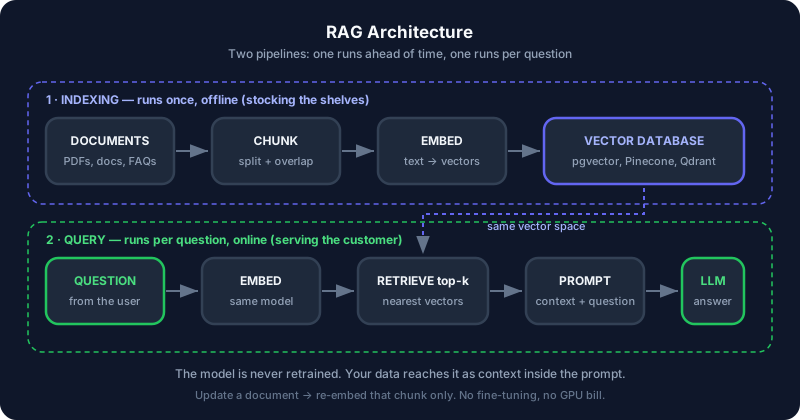
The thing that trips people up is assuming RAG is one pipeline. It's two, and they run at completely different times.
RAG architecture — an offline indexing pipeline feeding an online query pipeline through a vector database
Pipeline 1 — Indexing (offline). Runs once when you add documents, then again only when they change. Documents are split, converted to vectors, and stored. This is stocking the shelves.
Pipeline 2 — Query (online). Runs on every question, in milliseconds. The question is converted to a vector, the closest chunks are retrieved, and they're pasted into a prompt. This is serving the customer.
The critical detail: the model is never retrained. Your data reaches it as text inside the prompt. Change a document, re-embed that one chunk, and the next answer is correct. No GPU bill, no fine-tuning run, no waiting.
Why Not Just Fine-Tune?
This is the first question every team asks, so let's settle it.
| RAG | Fine-tuning | |
|---|---|---|
| Teaches the model | Facts | Style, format, tone |
| Update cost | Re-embed one chunk (seconds) | Full retraining run (hours, ₹₹₹) |
| Can cite sources | Yes — you know which chunk was used | No |
| Handles "I don't know" | Yes — retrieve nothing, answer nothing | Poorly — tends to confabulate |
| Setup complexity | Moderate | High |
The rule I use
Use RAG to change what the model knows. Use fine-tuning to change how it speaks. Almost every "we need the AI to know our data" request is a RAG problem, not a fine-tuning problem.
Stage 1: Chunking
An LLM has a context window — a hard limit on how much text fits in one request. You cannot paste a 200-page manual into a prompt. So documents get split into chunks.
Back to the shop: you don't hand the customer the entire supplier catalogue. You open it to the charger section.
But chunk size is a genuine tradeoff, and getting it wrong is the most common cause of a RAG system that "sort of works":
- Chunks too large — each one covers several topics, so its vector becomes an average of all of them and matches nothing precisely. You also burn context window on irrelevant text.
- Chunks too small — a chunk says "It is 14 days" with no indication of what is 14 days. Retrieval finds it; the LLM can't use it.
A sensible default for prose is 500–1,000 characters, or roughly a few paragraphs.
Why Chunks Must Overlap
Here is the failure that convinces everyone. Split a document at a fixed size and a sentence will eventually be cut in half — and it will be the sentence containing your answer.
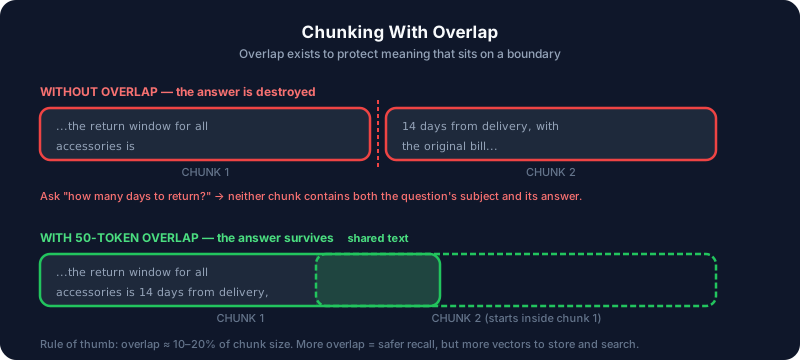 Chunking with overlap — a sentence split across a chunk boundary loses its meaning without shared text
Overlap means each chunk starts a little before the previous one ended, so boundary-straddling sentences survive intact in at least one chunk.
def chunk_with_overlap(text: str, chunk_size: int = 800, overlap: int = 100):
    """Split text into overlapping chunks.

    overlap must be smaller than chunk_size, otherwise the start pointer
    never advances and this loops forever.
    """
    if overlap >= chunk_size:
        raise ValueError("overlap must be smaller than chunk_size")

    chunks = []
    start = 0
    while start < len(text):
        end = start + chunk_size
        chunks.append(text[start:end])
        start += chunk_size - overlap
    return chunks
The infinite loop everyone writes once
If overlap >= chunk_size, then start += chunk_size - overlap advances by zero or goes backwards, and the loop never ends. The guard clause above exists because I have shipped this bug. Set overlap to roughly 10–20% of chunk size.
Splitting on raw character counts is the naive version. In production, split on structure first — paragraphs, then headings, then sentences — and only fall back to character counts. A chunk that ends mid-word helps nobody.
Step through the whole indexing pass to see where each chunk ends up:
1/5
Stage 2: Embeddings
Now each chunk needs to become searchable by meaning, not by keyword.
Keyword search fails constantly in a support context. A customer types "phone won't charge"; your document says "device fails to draw power". Zero shared keywords, identical meaning. Keyword search returns nothing.
An embedding converts text into a list of numbers — a vector — positioned so that similar meanings land near each other.
In the shop: an experienced assistant hears "battery backup chennagirbeku" and "long-lasting power" as the same request, even though not a single word matches. Embeddings give software that ability.
from sentence_transformers import SentenceTransformer

model = SentenceTransformer("all-MiniLM-L6-v2")

vectors = model.encode([
    "good battery life",
    "long-lasting power",
    "excellent camera quality",
])

print(vectors.shape)   # (3, 384) — each chunk becomes 384 numbers
Compare them and the structure becomes obvious:
from sentence_transformers import util

sim = util.cos_sim(vectors, vectors)

print(f"battery vs power:  {sim[0][1]:.2f}")   # ~0.79 — close in meaning
print(f"battery vs camera: {sim[0][2]:.2f}")   # ~0.21 — unrelated
Similarity runs from -1 to 1. Two chunks about battery life score high; battery versus camera scores low. Retrieval is just "give me the chunks with the highest score against this question".
Use the same model for both pipelines
Chunks and questions must be embedded by the same model. Different models produce vectors in different, incompatible spaces — the numbers still compare without erroring, so you get no exception, no warning, just silently meaningless results. If you ever swap embedding models, you must re-embed your entire corpus.
Stage 3: Vector Storage and Retrieval
Vectors go into a database that can answer "which stored vectors are closest to this one?" quickly — pgvector, Pinecone, Qdrant, Weaviate. Scanning every vector is fine for a thousand chunks and hopeless for a million, which is what these databases solve.
You retrieve top-k — the k closest chunks, typically 3 to 5.
- k too low — the answer sits in chunk 4 and you fetched 3.
- k too high — you flood the prompt with weakly-related text, and answer quality drops. More context is not better context.
Stage 4: Prompt Assembly
The final stage is plain string construction, and it's where accuracy is won or lost.
def build_prompt(question: str, chunks: list[str]) -> str:
    context = "\n\n---\n\n".join(chunks)
    return f"""Answer the question using ONLY the context below.
If the context does not contain the answer, say "I don't have that
information" — do not use outside knowledge.

CONTEXT:
{context}

QUESTION: {question}
"""
Two instructions are doing real work here:
- "ONLY the context below" stops the model from blending your policy with something it half-remembers from the internet.
- "say I don't have that information" gives it a legitimate exit. Without an explicit escape hatch, a model asked a question it cannot answer will invent something — that is the behaviour you were trying to eliminate in the first place.
Common Mistakes to Avoid
Mistake 1: Assuming Retrieval Failure Is a Model Problem
When a RAG answer is wrong, the instinct is to blame the LLM or upgrade to a bigger one. In my experience it is almost always retrieval — the right chunk never reached the prompt.
# ❌ Wrong — no visibility into what was actually retrieved
answer = llm(build_prompt(question, retrieve(question)))

# ✅ Correct — log the chunks and scores before blaming the model
chunks, scores = retrieve(question, return_scores=True)
for c, s in zip(chunks, scores):
    print(f"[{s:.3f}] {c[:80]}...")
answer = llm(build_prompt(question, chunks))
Print the retrieved chunks first. If the answer isn't in them, no model on earth can produce it.
Mistake 2: Chunking on Character Count Alone
Splitting mid-sentence, mid-table, or mid-code-block produces chunks that are individually meaningless. Split on structure — paragraph, then heading, then sentence — and treat raw character counts as the last resort.
Mistake 3: Forgetting to Re-Index Updated Documents
The vector database holds a snapshot. Edit the source PDF and your index still serves the old text, confidently and forever. Whatever writes documents must also trigger re-embedding — this is the RAG bug that survives longest in production, because nothing errors.
Mistake 4: No Citations
If you store the source filename and position alongside each chunk, you can show users where an answer came from. This costs almost nothing at index time and is impossible to retrofit cheaply. It is also the single feature that makes users trust the system.
Hands-On Assignment — Build a Shop FAQ Bot
Build a working RAG pipeline over a small document. No cloud services required.
pip install sentence-transformers numpy
Task 1: Chunk a Document
Take the text below and split it with chunk_with_overlap. Print each chunk and confirm consecutive chunks share text.
policy = """
All mobile accessories carry a 6-month manufacturer warranty covering
manufacturing defects. Physical damage and water damage are not covered.
The return window for all accessories is 14 days from the date of delivery,
provided the original bill is presented. Refunds are processed to the
original payment method within 5 working days. Screen protectors and
earphones cannot be returned once the seal is opened, for hygiene reasons.
"""

chunks = chunk_with_overlap(policy, chunk_size=200, overlap=40)
for i, c in enumerate(chunks):
    print(f"--- chunk {i} ---\n{c}\n")
Task 2: Embed and Retrieve
Embed the chunks, embed a question, and return the top 2 by cosine similarity.
from sentence_transformers import SentenceTransformer, util

model = SentenceTransformer("all-MiniLM-L6-v2")
chunk_vectors = model.encode(chunks)

def retrieve(question: str, k: int = 2):
    q_vector = model.encode([question])
    scores = util.cos_sim(q_vector, chunk_vectors)[0]
    top = scores.argsort(descending=True)[:k]
    return [(chunks[i], float(scores[i])) for i in top]

for chunk, score in retrieve("how many days do I have to return something?"):
    print(f"[{score:.3f}] {chunk[:70]}...")
Now try asking "can I return opened earphones?" and watch a completely different chunk come back. That is semantic search working — neither question shares many keywords with the text that answers it.
Task 3: Prove the Guardrail Works
Assemble the prompt with build_prompt and ask something the document cannot answer, like "do you sell laptops?". A correctly built pipeline replies "I don't have that information" instead of inventing an answer.
How to Run This
Save the tasks in one file as rag_demo.py and run python rag_demo.py. The first run downloads the embedding model (~80MB) and takes a minute; after that it's instant and fully offline.
Key Takeaways
Remember These
- RAG is two pipelines — indexing runs offline, querying runs per question.
- The model is never retrained. Your data arrives as context inside the prompt.
- Chunk on structure, not character counts, and always overlap by 10–20%.
- Embeddings enable meaning-based search, so "won't charge" finds "fails to draw power".
- Chunks and questions must use the same embedding model — mismatches fail silently.
- Always instruct the model to answer only from context and to admit when it can't.
- When an answer is wrong, inspect the retrieved chunks first. It's usually retrieval, not the model.
What's Next?
- Generative AI Explained: Tokens, Embeddings, and How GPT Actually Works — the layer underneath RAG, and where embeddings come from
- JavaScript Promises: The Complete Guide to Async Code — for wiring a RAG pipeline into a web app without blocking

Written by Sharanayya R Tenginamath
Software Engineer at McD BERL with 4 years building scalable full-stack applications with React.js, Next.js, TypeScript, FastAPI and Python. Available to join from Oct 12, 2026.
Related articles
- AI
- Machine Learning
Generative AI Explained: Tokens, Embeddings, and How GPT Actually Works
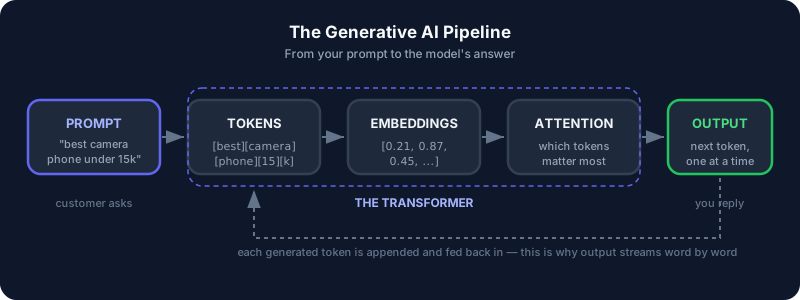
Understand what really happens between your prompt and ChatGPT's answer — tokenization, embeddings, positional encoding, self-attention, and transformers — explained with a mobile shop analogy, runnable Python, and diagrams.
12 min read